EducationSoftwareStrategy.com
StrategyCommunity

Knowledge Base

Product

Community

Knowledge Base

TopicsBrowse ArticlesDeveloper Zone

Product

Download SoftwareProduct DocumentationSecurity Hub

Education

Tutorial VideosSolution GalleryEducation courses

Community

GuidelinesGrandmastersEvents
x_social-icon_white.svglinkedin_social-icon_white.svg
Strategy logoCommunity

© Strategy Inc. All Rights Reserved.

LegalTerms of UsePrivacy Policy
  1. Home
  2. Topics

KB30243: "None of the selected reports can make use of Dynamic Sourcing" message appears after analyzing reports in MicroStrategy Cube Advisor


Stefan Zepeda

Salesforce Solutions Architect • Strategy


SYMPTOM
 
After selecting a number of reports in Strategy Cube Advisor 9.0 and clicking the "Get Cube Recommendations" button, the Cube Advisor analyzes the reports and displays the following result.
 

ka02R000000kVqLQAU_0EM440000002EWb.gif

 
None of the selected reports can make use of Dynamic Sourcing
 
CAUSE
 
This message may be displayed for one of the following reasons:

  • The message is accurate, and all of the selected reports use product features that are not supported for Dynamic Sourcing.

    For a list of features not compatible with Dynamic Sourcing, consult the Strategy In-memory Analytics Guide product manual.
     
  • Metric Levels logging was not configured properly on the Strategy Intelligence Server machine prior to the report analysis. Strategy Cube Advisor uses the Metric Levels log file as the primary basis for its Intelligent Cube recommendations. If logging is not enabled, the log file will be empty between the starting and ending timestamps of the report analysis. In that case, Strategy Cube Advisor will not find any reports for which to build Intelligent Cubes.

ACTION
 
Go to the Strategy Intelligence Server machine and launch the Strategy Diagnostics and Performance Logging tool. Check the "Dynamic Sourcing" component and verify that a file destination is configured for the Metric Levels Log dispatcher.
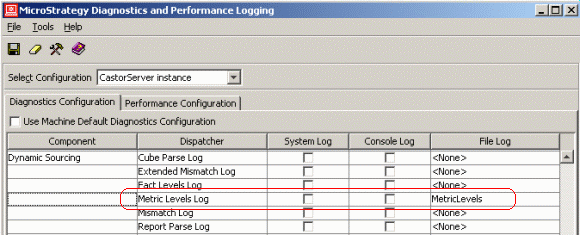
 

ka02R000000kVqLQAU_0EM440000002EWd.gif

 
It is strongly recommended to use a separate log file (not DSSErrors.log).
 
If the Strategy Cube Advisor is run on a machine other than the Strategy Intelligence Server host, configure the UNC path to the log file before clicking "Get Cube Recommendations." Use the Tools > Options menu item.
 

ka02R000000kVqLQAU_0EM440000002EWe.gif

 
Strategy Cube Advisor must have access to this file. If remote access to the file is not possible, it may be necessary to run the report analysis manually. Consult the following Strategy Knowledgebase document for details on this procedure.
 
KB30060: How to use MicroStrategy Cube Advisor with MicroStrategy Intelligence Server Universal 9.0


Comment

0 comments

Details

Knowledge Article

Published:

May 22, 2017

Last Updated:

May 22, 2017