EducationSoftwareStrategy.com
StrategyCommunity

Knowledge Base

Product

Community

Knowledge Base

TopicsBrowse ArticlesDeveloper Zone

Product

Download SoftwareProduct DocumentationSecurity Hub

Education

Tutorial VideosSolution GalleryEducation courses

Community

GuidelinesGrandmastersEvents
x_social-icon_white.svglinkedin_social-icon_white.svg
Strategy logoCommunity

© Strategy Inc. All Rights Reserved.

LegalTerms of UsePrivacy Policy
  1. Home
  2. Topics

KB30290: How to optimize performance of database inserts for Multisource and Datamart reporting in MicroStrategy 10.x


Community Admin

• Strategy


This article describes how to optimize the performance of database inserts for ROLAP databases with Multisource and Datamart reporting in MicroStrategy

In some scenarios, a Strategy report must select some data into memory, perform some calculations, and insert the results into an intermediate table in the data warehouse. These scenarios include:

  • Datamart reports where the output table resides in a database other than the primary data warehouse.
  • Metrics using functions that must be evaluated in the Strategy Analytical Engine.
  • Custom group banding qualifications where the banding method is set to "Treat banding as normal calculation" in the "Custom group banding method" VLDB Properties.
  • Reports that combine data from multiple warehouses using the Multisource option.

One INSERT statement is issued for each result row:
SQL
insert into TABLE_NAME values (col0, col1, col2…);
Enabling parameterized queries in the Strategy database connection object can improve the performance of these repeated inserts. Without parameterized queries, the database may have to parse the INSERT statements individually and generate a separate execution plan for each. By contrast, a parameterized query is parsed only once, and repeatedly executed according to the same execution plan with different values for the input parameters. Response time is faster without the overhead of parsing structurally identical statements for every row.
 
Enabling parameterized queries in the Strategy Database Connection object
To use parameterized queries, the Strategy Database Connection object, which holds connection parameters to the database, must enable the option. This option is visible in Strategy Developer by the following steps.
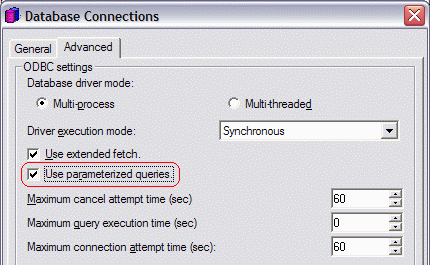
  1. In the Database Instance Manager, edit the Database Instance.
  2. Click "Modify..." to edit the Database Connection.
  3. "Use parameterized queries" is located on the Advanced tab.
ka04W000001MKsYQAW_0EM440000002EVo.gif

 
Database platform support for parameterized queries 
Not all databases support parameterized queries. Following is a list of the database platforms supported in Strategy 10.x, according to their level of support for parameterized queries.
Databases that support parameterized queries without additional Data Source Name (DSN) settings

  • Actian Vectorwise with native driver
  • Amazon Redshift with PostgreSQL driver
  • Amazon Redshift with Strategy driver
  • Aster nCluster 4.6.x and higher with native driver
  • EnterpriseDB with native driver
  • EXASolution with native driver
  • HP Neoview with native driver
  • IBM DB2 UDB for iSeries with Strategy driver
  • IBM DB2 UDB for iSeries with native driver
  • IBM DB2 UDB for Linux, UNIX & Windows with Strategy driver
  • IBM DB2 UDB for Linux, UNIX & Windows with native driver
  • IBM DB2 UDB for z/OS with Strategy driver
  • IBM DB2 UDB for z/OS with native driver
  • IBM Netezza with native driver
  • Infobright with Strategy driver
  • Informix Dynamic Server with native driver
  • Microsoft SQL Database with Strategy driver
  • Microsoft SQL Database with native driver - Windows
  • Microsoft SQL Server with SQL Server - Windows
  • Microsoft SQL Server with Native Client - Windows
  • Microsoft SQL Server with Strategy driver
  • MySQL Community Server with native driver
  • Oracle with native driver
  • ParAccel with native driver
  • Red Brick with native driver
  • Salesforce with Strategy driver
  • SAP HANA 1.0 Sp2 with native driver
  • Sybase IQ with native driver
  • Teradata with native driver
  • Text files with native driver
  • Vertica with native driver

Databases that support parameterized queries after enabling additional Data Source Name (DSN) settings
The following databases require "Enable Describe Parameters" to be configured in the DSN.

  • Greenplum with Strategy driver
  • MySQL Enterprise with Strategy driver
  • Oracle with Strategy driver
  • PostgreSQL with Strategy driver
  • Sybase ASE with Strategy driver

Strategy ODBC Driver for Oracle Wire Protocol:
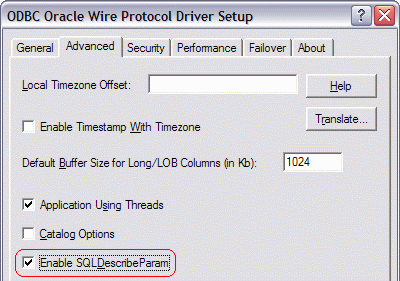
ka04W000001MKsYQAW_0EM440000002EVf.gif

 
Strategy ODBC Driver for Sybase ASE Wire Protocol:
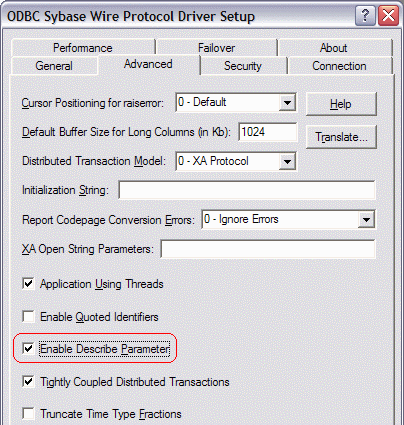
ka04W000001MKsYQAW_0EM440000002EVd.gif

Note: For Strategy Intelligence Server Universal running under UNIX/Linux, the following line should be added to the DSN definitions in odbc.ini, located in the Strategy home directory chosen during installation. This line is valid for the Strategy ODBC drivers for both Oracle and Sybase ASE.
EnableDescribeParam=1
The following databases require Teradata ODBC Driver version 12.00.00.00 or later, with the "Enable Extended Statement Information" parameter checked.
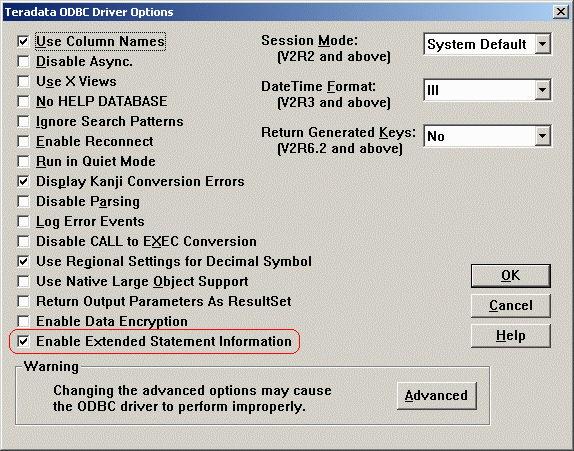
  • Teradata 12.0
  • Teradata V2R6.2
ka04W000001MKsYQAW_0EM440000002EVl.gif

Note: For Strategy Intelligence Server Universal running under UNIX/Linux, the following line should be added to the Teradata DSN definition(s) in odbc.ini:
EnableExtendedStmtInfo=Yes
Databases that do not support parameterized queries

  • Apache Hive with Strategy driver
  • Aster nCluster with native driver
  • Composite with native driver
  • Hadoop Amazon EMR Cloud with Strategy driver
  • Hadoop Apache with Strategy driver
  • Hadoop/Hive with Cloudera driver
  • Hadoop MapR M3/M5/M7 with Simba driver
  • Hadoop MapR M3/M5/M7 with Strategy driver
  • Impala with Strategy driver
  • Informix Dynamic Server with Strategy driver
  • Informix Extended Parallel Server with Strategy driver
  • Kognitio WX with native driver
  • SAND CDBMS 6.1 with native driver
  • Text files with Strategy driver


Comment

0 comments

Details

Knowledge Article

Published:

April 4, 2017

Last Updated:

April 4, 2017