EducationSoftwareStrategy.com
StrategyCommunity

Knowledge Base

Product

Community

Knowledge Base

TopicsBrowse ArticlesDeveloper Zone

Product

Download SoftwareProduct DocumentationSecurity Hub

Education

Tutorial VideosSolution GalleryEducation courses

Community

GuidelinesGrandmastersEvents
x_social-icon_white.svglinkedin_social-icon_white.svg
Strategy logoCommunity

© Strategy Inc. All Rights Reserved.

LegalTerms of UsePrivacy Policy
  1. Home
  2. Topics

KB30293: What is the row and column limit displaying and exporting grid reports in MicroStrategy Developer 9.4.x-10.x?


Stefan Zepeda

Salesforce Solutions Architect • Strategy


This knowledge base article outlines the row and column limit displaying and exporting grid reports in MicroStrategy Developer 9.4.x-10.x.

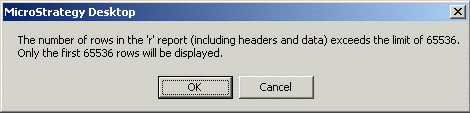
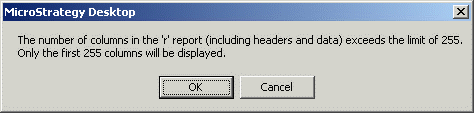
In Strategy Developer 9.4.x-10.x, the grid view display limitation for row is 65,536 and for column is 255. If the limitation is exceeded, Developer will show the following two warning messages:
ka02R000000kb8bQAA_0EM440000002EV2.gif


The number of rows in the 'r' report (including headers and data) exceeds the limit of 65536.Only the first 65536 rows will be displayed.
ka02R000000kb8bQAA_0EM440000002EVD.gif


The number of columns in the 'r' report (including headers and data) exceeds the limit of 255.Only the first 255 columns will be displayed.

To avoid the display limitation, please refer to the tech note below for more details:
KB46822: User cannot export more than 65,536 rows to Microsoft Excel 2007 from MicroStrategy Developer 9.4.x - 10.x
In Microsoft Excel 2007, the worksheet size has increased to maximum 1,048,576 rows by 16,384 columns. Refer to the Microsoft Excel 2007 specifications and limits document:
http://office.microsoft.com/en-us/excel/HP100738491033.aspx
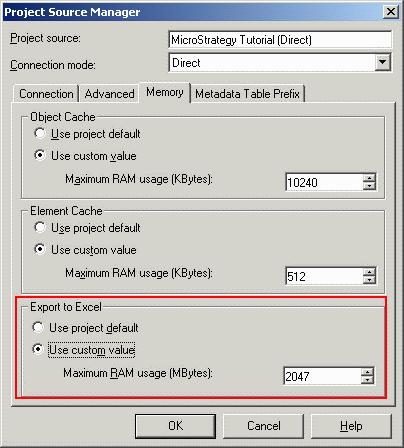
In Strategy Developer 9.4.x-10.x, exporting to Excel 2007 is also subject to the limitation (1,048,576 rows by 16,384 columns). However, users should also consider the maximum memory consumption limit for exporting to Excel. By default, "Export to Excel" max memory usage is set to 100 MB. To increase the number:

  1. Right click on the target project source.
  2. Select "Modify Project Source"
  3. Go to "Memor"y tab > "Export to Excel"

The maximum RAM usage is 2047 MB (2 GB):
ka02R000000kb8bQAA_0EM440000002EVC.gif

So for example, if users try to export a report with rows and columns lower than 1,048,576 and 16,384, but the export memory consumption is more than 2 GB then the export fails.
KB30293


Comment

0 comments

Details

Knowledge Article

Published:

April 10, 2017

Last Updated:

May 2, 2018