Upgrading the Strategy Enterprise Manager 9.x metadata from pre-9.4.1 versions to the 9.4.1+ version involves three possible scenarios:
Scenario 1:
If users want to use their current Enterprise Manager pre-9.4.1 project, then it is NOT necessary to re-transfer the Enterprise Manager Metadata from the Enterprise Manager Metadata in Access that is shipped with the latest version of Strategy Enterprise Manager.
Users can go ahead and continue to use the current Enterprise Manager pre-9.4.1 project and just need to upgrade their metadata version from that pre-9.4.1 version to the current version of Strategy. Both metadata upgrade and project upgrade are required if the Enterprise Manager project is in a separate metadata by itself. If the Enterprise Manager Project is part of a metadata that contains several other projects and that metadata was already upgraded to the latest version of Strategy, then it is sufficient for the users to just upgrade the project to the latest 9.x version.
Scenario 2:
Users wish to take advantage of the new objects (such as attributes, reports, metrics, etc.) in the latest Enterprise Manager project but do not want customized objects from the earlier Enterprise Manager pre-9.4.1 project.
Users can transfer the Enterprise Manager metadata in Access, that is shipped with the latest version of Strategy Enterprise Manager into the required database, as though installing Enterprise Manager for the first time and thus start with a new Strategy Enterprise Manager metadata. This transfer is done from Strategy Enterprise Manager Console 9.x. They should, however, NOT transfer the Enterprise Manager Warehouse. For further details on transferring the Enterprise Manager Metadata, refer to the System Administration Guide > Monitoring the System > Using Enterprise Manager and Statistics > Initialize your Enterprise Manager Production environment. The System Administration Guide is located at (by default) Start > Programs > Strategy > Product Manuals. It may also be accessed from the Documentation folder of the product install CD or download and is named Admin.pdf.
Scenario 3:
Users wish to take advantage of the new objects in the latest Enterprise Manager 9.4.1+ project as well as retain the customized objects from the earlier pre-9.4.1 Enterprise Manager project.
IMPORTANT: The instructions below assume that NO schema objects in the Enterprise Manager project were modified. Also, existing application objects were not modified. Modifications were made to copies of existing application objects or new application objects were created.
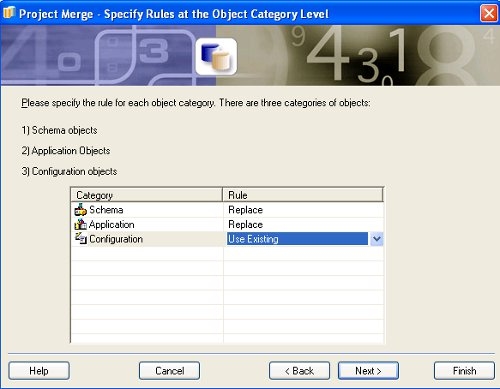
In this scenario, users can upgrade their existing metadata version to the latest 9.x. metadata version and also upgrade the project to the latest 9.x. version. Also, users should follow scenario 2 and create the latest 9.x Enterprise Manager project in the required metadata. After this, a project merge should be performed between both the projects. Detailed instructions are provided below.
Follow the steps below to accomplish Scenario 3:
Refer to the following Strategy Knowledge Base document for information on a warning message related to Strategy Enterprise Manager project upgrade:
KB38292: On Strategy Enterprise Manager console 9.x, users get a warning about upgrading the Enterprise Manager environment, even after upgrading the Enterprise Manager warehouse and statistics to the latest version.
