EducationSoftwareStrategy.com
StrategyCommunity

Knowledge Base

Product

Community

Knowledge Base

TopicsBrowse ArticlesDeveloper Zone

Product

Download SoftwareProduct DocumentationSecurity Hub

Education

Tutorial VideosSolution GalleryEducation courses

Community

GuidelinesGrandmastersEvents
x_social-icon_white.svglinkedin_social-icon_white.svg
Strategy logoCommunity

© Strategy Inc. All Rights Reserved.

LegalTerms of UsePrivacy Policy
  1. Home
  2. Topics

KB30310: How to create a Freeform SQL Report in MicroStrategy Developer 9.4.1


Stefan Zepeda

Salesforce Solutions Architect • Strategy


KB30310: How to create a Freeform SQL Report in MicroStrategy Developer 9.4.1

The editor to create a Freeform SQL report in Strategy Desktop 9.4.1 no longer has the Freeform SQL template under the general section when creating a new report.
 
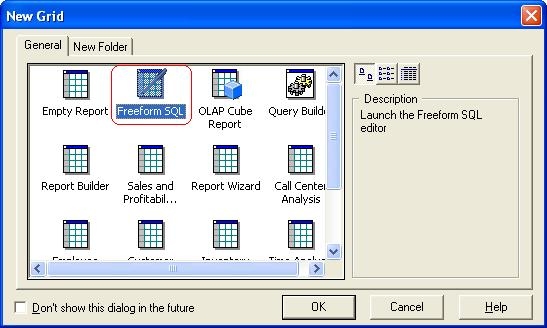
In Strategy 8.x, the following templates could be selected from in order to define a new Freeform SQL report:
 

ka02R000000kUmcQAE_0EM440000002EV3.jpeg

 
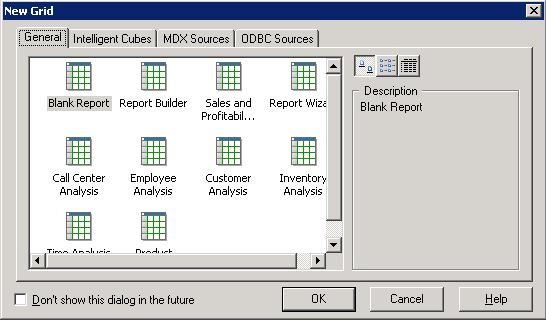
However, when defining a new report in Strategy Desktop 9.4.1 the following options are available:
 

ka02R000000kUmcQAE_0EM440000002EV5.jpeg

 
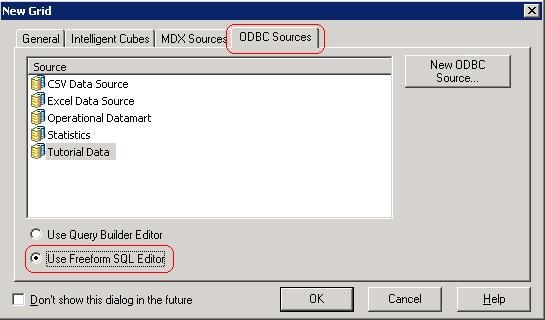
The option to define a Freeform SQL report has been moved into the "ODBC Sources" tab of this window, as shown below:
 

ka02R000000kUmcQAE_0EM440000002EV6.jpeg

 
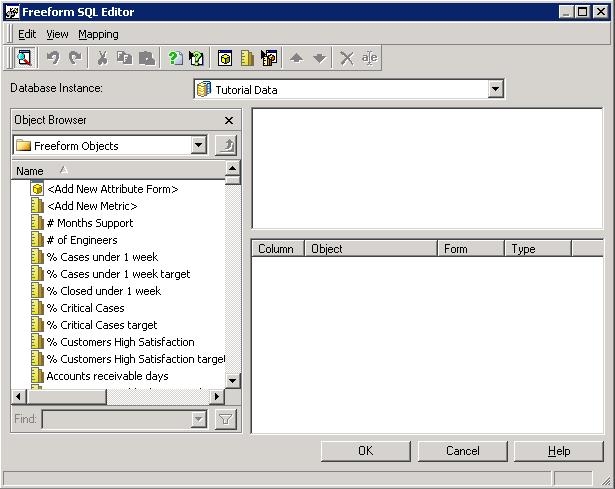
By enabling the radio button to "Use Freeform SQL Editor" a new Freeform SQL report can be defined.
 

ka02R000000kUmcQAE_0EM440000002EV4.jpeg

Comment

0 comments

Details

Knowledge Article

Published:

June 2, 2017

Last Updated:

June 2, 2017