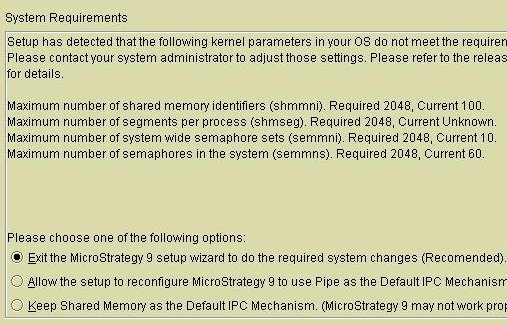
When performing the installation of the Strategy Intelligence Server on Linux or Unix operating systems, users may be prompted with a screen similar to the following:
The Strategy Intelligence Server typically runs as a multi-process application. In this mode, the Strategy Intelligence Server will create child processes (M8MulPrc / MJMulPrc / M8PrcSvr ), primarily to communicate and query the data warehouse and other data sources. This architecture is useful, because the main Intelligence Server process is then isolated from any misbehavior in the ODBC drivers or communication problems with the data source.
Communication between the Intelligence Server process and the child processes is called Inter - Process Communication (IPC) and there are multiple ways in which this can be achieved. In Strategy versions prior to version 9, IPC on Unix/Linux platforms was through the use of 'named pipes'. These named pipes appear as files in the /tmp or /var/tmp folder and provided the communication link between the two processes.
The main disadvantage of using pipes is that in some scenarios, the pipes may not be cleared up by the Intelligence Server after termination because of synchronization problems - especially in a high load environment. Other disadvantages with using named pipes is a slightly slower performance in communications. Beginning in Strategy 9, the Intelligence Server defaults to using shared memory to communicate between the different database communication processes on the machine.
The benefits of using shared memory for IPC are substantial, however there are a few caveats to be considered when using this. The first of these is the number of shared memory segments used by the Intelligence Server. Because this number is directly proportional to the number of jobs executing against the warehouse and metadata, this number can be quite large. The other thing to consider is synchronization of access to the shared memory segments. The Strategy multi-process architecture will make use of a system 'semaphore' to guard against unsynchronized access to the shared memory.
By default, typical Unix/Linux systems are not configured to support applications with a large number of shared memory segments or semaphores. Typically, additional tuning is required for the OS to be able to support the Strategy Intelligence Server in the shared memory usage scenario. During the installation of the Strategy Intelligence Server, the installation routine will check the current shared memory and semaphore limits of the operating system and suggest a new value if appropriate. Users also have the option of choosing to continue to use the older 'named pipe' mechanism for IPC if so desired.
In the screen shot above, when the system resources are deemed insufficient by the installation process, users can either choose to exit the installation and manually change the kernel parameters, or to use the named pipes method or to continue with the installation even if there are inadequate resources (and change the settings manually later).
There are several different configuration settings for shared memory and semaphores on Unix/Linux systems:
shmmax: The maximum size of a shared memory segment.
shmmin: The smallest possible shared memory segment size.
shmmni: The maximum number of shared memory identifiers at any given time.
shmseg: The maximum number of segments per process.
semmni: The maximum number of system wide semaphore sets / IDs.
semmns: The maximum number of semaphores in the system.
In general, Strategy is not concerned with the default settings for shmmax and shmmin - since the default values on most platforms should be sufficient. However the shmmni, shmseg, semmni and semmns settings may need to be changed depending on the operating system platform. The table below shows suggest values for these parameters for a typical Strategy Intelligence Server deployment across different platforms:
4 slaves : r4.16xlarge (64vCPU, 488 GB RAM: 1.5 TB hard drive) | 4 slaves : r4.16xlarge (64vCPU, 488 GB RAM: 1.5 TB hard drive) | |||
4 slaves : r4.16xlarge (64vCPU, 488 GB RAM: 1.5 TB hard drive) | 4 slaves : r4.16xlarge (64vCPU, 488 GB RAM: 1.5 TB hard drive) | 4 slaves : r4.16xlarge (64vCPU, 488 GB RAM: 1.5 TB hard drive) | 4 slaves : r4.16xlarge (64vCPU, 488 GB RAM: 1.5 TB hard drive) | 4 slaves : r4.16xlarge (64vCPU, 488 GB RAM: 1.5 TB hard drive) |
4 slaves : r4.16xlarge (64vCPU, 488 GB RAM: 1.5 TB hard drive) | 4 slaves : r4.16xlarge (64vCPU, 488 GB RAM: 1.5 TB hard drive) | 4 slaves : r4.16xlarge (64vCPU, 488 GB RAM: 1.5 TB hard drive) | 4 slaves : r4.16xlarge (64vCPU, 488 GB RAM: 1.5 TB hard drive) | 4 slaves : r4.16xlarge (64vCPU, 488 GB RAM: 1.5 TB hard drive) |
4 slaves : r4.16xlarge (64vCPU, 488 GB RAM: 1.5 TB hard drive) | by the kernel up to 131072 | 131072 | by the kernel up to 4096 | by the kernel unlimited / 65535 |
unlimited / 65535 | unlimited / 65535 | unlimited / 65535 | unlimited / 65535 | unlimited / 65535 |
unlimited / 65535 | unlimited / 65535 | unlimited / 65535 | unlimited / 65535 | unlimited / 65535 |
Note: This minimum values are validated by the Strategy Installer.
Changing the default number of shared memory segments and semaphore sets is a system wide operation and affects other processes on the machine. Users needing to make these changes should contact their system administrators to discuss the implications of making such changes and to implement the changes.
NOTE:
On Solaris 10, these settings are named differently and can be set or checked using the 'prctl' command:
shmmni = project.max-shm-ids
semmni = project.max-sem-ids
semmsl = process.max-sem-nsems
semmns is not an available parameter in Solaris 10 and defaults to the maximum of (semmsl * semmni)
