Strategy 9 release includes the following packaging and licensing changes/additions:
1. Modular Products Only
In prior releases, Strategy used 2 price lists – modular and non-modular. The difference was in how the features of Web and Desktop were linked to different Web and Desktop editions. Modular uses a building block approach where Web Analyst, Web Professional, Web Multi-Media Trainer (MMT), and Web Universal are add-ons to Web Reporter, Desktop Designer is an add-on to Desktop Analyst, and each add-on contains its own functionality that is not available in another product. Strategy 9 only uses modular products and all customers with non-modular products will be converted:
2. Standard Edition Is No Longer Offered
In earlier releases, Strategy Intelligence Server was shipped as three different editions: Standard, Enterprise, and Universal. Beginning with Version 9.0, Strategy Intelligence Server will be shipped as two editions: Enterprise and Universal.
3. Introduction of Distribution Services Option as an add-on to Intelligence Server
Strategy Distribution Services, a new product introduced in the Strategy 9 BI platform, provides high-volume, high-performance, automated report and dashboard distribution via email, file servers, and networked printers. From small departments to enterprise-wide BI deployments, Strategy Distribution Services is optimized to deliver business performance reporting to 10s or 100,000s of people. Strategy Distribution Services places the control of information distribution into the hands of the business user. Business users can subscribe themselves or others to receive reports and/or dashboards on a schedule, on an event, or on an alert basis – all without any assistance from IT administrators. Notably, business users can set up their own “personal alert” conditions, that, when met, will trigger report or dashboard distributions. With personal alerts, Strategy Distribution Services monitors business performance for the business user, guaranteeing the latest, critical information promptly reaches key decision makers.
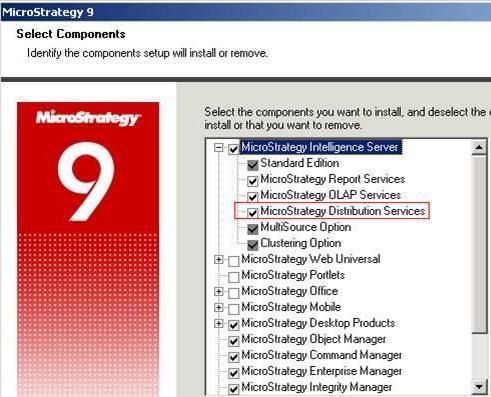
The Strategy Distribution Services installation component is depicted in the screenshot below:
The following screenshot from the User Editor depicts the privileges associated with Distribution Services:
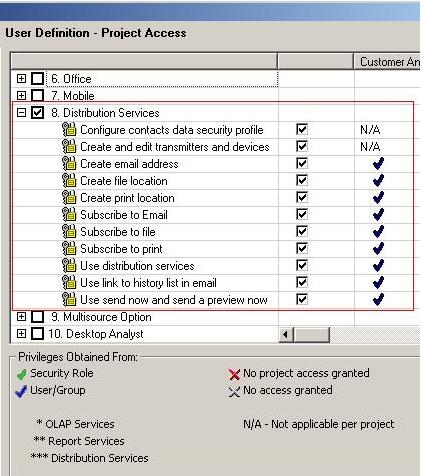
In addition, there are certain privileges within the 'Web Analyst' and 'Desktop Designer' license types that count towards Distribution Services. These privileges are marked by triple asterisk (***) in the interface and they include the following:
Web Analyst:
Desktop Designer:
4. Introduction of MultiSource Option as an add-on to Intelligence Server
Strategy MultiSource Option is a new and fully integrated add-on component of Strategy Intelligence Server. It allows users to seamlessly report, analyze, and monitor data across multiple sources through a single business model.
With Strategy MultiSource Option, BI architects and developers can build a single multidimensional model spanning multiple data sources including data warehouses, data marts, operational databases, and departmental databases. Since Strategy MultiSource Option is completely transparent to users and developers, they can benefit from a unified view of the business, regardless of the underlying data stores.
Strategy MultiSource Option represents the next logical evolution of Strategy ROLAP technology, extending its unparallel scalability, analytical depth and query performance to heterogeneous data source environments.
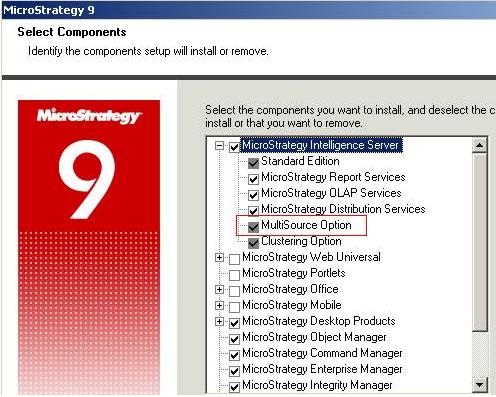
Strategy MultiSource Option displays as an installation component under Strategy Intelligence Server as depicted below:
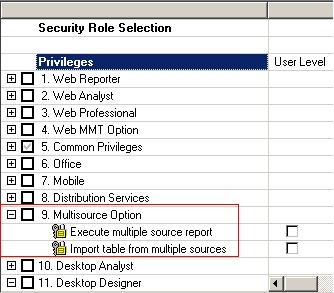
The following screenshot from the User Editor depicts the privileges associated with the MultiSource option:
MultiSource Option includes a 32-Bit OpenAccess for SalesForce ODBC driver for Intelligence Server installations on Windows. Unlike the Strategy ODBC drivers, this driver is installed separately. Refer to the following Knowledge Base technical note for details on the SalesForce usage for MultiSource:
KB30283 - How to configure Strategy 9.x products to work with Salesforce
5. Break-up of Strategy Administrator into three independent products
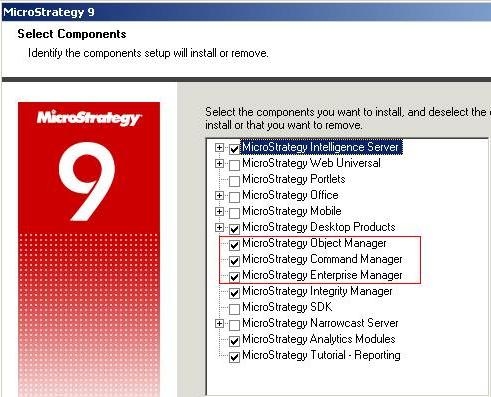
In earlier Strategy releases, Command Manager, Enterprise Manager and Object Manager were bundled into a product called Strategy Administrator. Starting from Strategy 9, Strategy Command Manager, Strategy Enterprise Manager and Strategy Object Manager are available as three separate products.
These three products appear as three distinct installation components, as shown on the screenshot below:
6. Out-of-the-box Portlets are included in Strategy Web
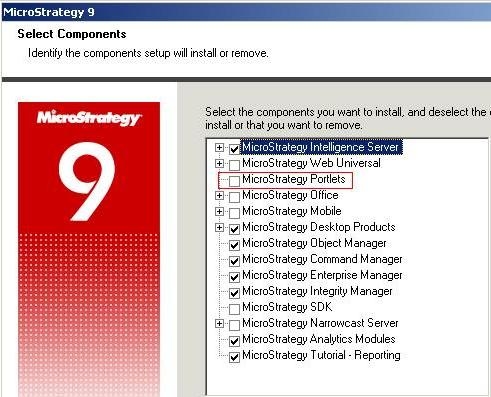
Strategy Web can be integrated and configured on portal environments such as IBM WebSphere Portal, Microsoft Office SharePoint Portal, SAP NetWeaver Portal, and Oracle WebLogic. In prior Strategy releases, portal integration was included in the Strategy SDK. In Strategy 9, the out-of-the-box portal integration called “Strategy Portlets” are included with Strategy Web.
The components window on both Strategy Windows and UNIX installations displays Strategy Portlets as an installable component:
7. Strategy Cube Advisor
Strategy 9 ships a new utility called Strategy Cube Advisor to assist in the use of the Dynamic Sourcing functionality in Strategy OLAP Services 9.x Dynamic sourcing extends the accessibility of Intelligent Cubes by allowing regular reports to automatically access published Intelligent Cubes that can satisfy the data requirements of the report.
Strategy Cube Advisor provides the following features for creating and supporting a dynamic sourcing strategy:
For additional information on Dynamic Sourcing and Strategy Cube Advisor tool, refer to "Chapter 8: Dynamic Sourcing" in the Strategy 9 OLAP Services product manual.
