EducationSoftwareStrategy.com
StrategyCommunity

Knowledge Base

Product

Community

Knowledge Base

TopicsBrowse ArticlesDeveloper Zone

Product

Download SoftwareProduct DocumentationSecurity Hub

Education

Tutorial VideosSolution GalleryEducation courses

Community

GuidelinesGrandmastersEvents
x_social-icon_white.svglinkedin_social-icon_white.svg
Strategy logoCommunity

© Strategy Inc. All Rights Reserved.

LegalTerms of UsePrivacy Policy
  1. Home
  2. Topics

KB30339: "Error initializing licensing API" or "Error decrypting behavior file or file not found" error occurs when opening MicroStrategy License Manager


Community Admin

• Strategy


"Error initializing licensing API" or "Error decrypting behavior file or file not found" error occurs when opening MicroStrategy License Manager 9.x

SYMPTOM:
When opening Strategy License Manager 9.x, the following error message is received:
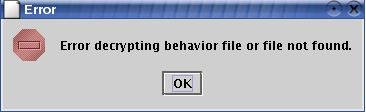
 

ka04W000000Of6PQAS_0EM440000002B5Y.jpeg

 
Sample Code/Error
Error decrypting behavior file or file not found.
 
When opening Strategy License Manager 9.x from the command line, a different error is reported:

 

ka04W000000Of6PQAS_0EM440000002B5e.jpeg

 
Sample Code/Error
Error initializing licensing API
 
CAUSE:
This issue occurs due to a missing or corrupted Strategy behavior file (mstr.bhv). This error can also occur if there are insufficient permissions to read the file.
 
ACTION:
Follow these steps in order to resolve the issue:
 

  • Windows environments
    • Verify that the mstr.bhv file exists under the <drive>:\Program Files\Common Files\Strategy folder
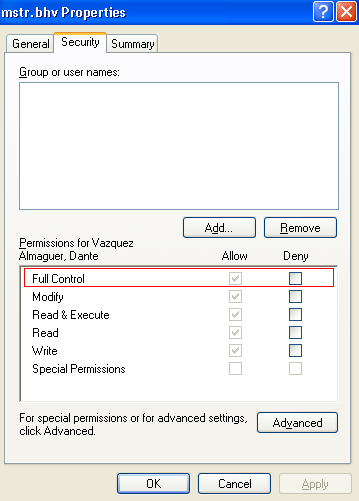
    • If the file exists, confirm that the Windows account used to run Strategy License Manager 8.x - 9.x has 'Full Control' permissions on it:
       
      • Right-click on the file and select Properties.
      • Go to the Security tab, and grant 'Full Control' permissions to the Windows account running Strategy License Manager 9.x:
ka04W000000Of6PQAS_0EM440000002B5a.jpeg
  • If the file exists and the permissions are set correctly, the file may be corrupted. Strategy 9.x needs to be reinstalled to regenerate the file. Follow the same steps for if the file does not exist to reinstall Strategy 9.x.
  • If the file does not exist, Strategy 9.x needs to be reinstalled to regenerate the file:
    • Uninstall Strategy 9.x using Add/Remove Programs.
    • Manually delete the <drive>:\Program Files\Common Files\Strategy folder.
    • Reboot the machine.
    • Install Strategy 9.x.


  • UNIX environments
    • Verify that the mstr.bhv file exists under the <MSTR_HOME_PATH> folder, where <MSTR_HOME_PATH> is the directory specified as the Home directory during Strategy 9.x installation.
    • If the file exists, confirm that the user account running Strategy License Manager 9.x has Read and Write permissions on it:
       
      •  If the file does not have permissions, grant them:
ka04W000000Of6PQAS_0EM440000002B5U.jpeg
    • If the file exists and the permissions are set correctly, the file may be corrupted. Strategy 9.x needs to be reinstalled to regenerate the file. Follow the same steps for if the file does not exist to reinstall Strategy 9.x.
  • If the file does not exist, Strategy 9.x needs to be reinstalled to regenerate the file:
    • Uninstall Strategy using the uninstaller (uninstall.bin) available under the <MSTR_HOME_PATH>/install/_uninst folder.
    • Install Strategy 9.x.

Comment

0 comments

Details

Knowledge Article

Published:

June 8, 2017

Last Updated:

June 8, 2017