EducationSoftwareStrategy.com
StrategyCommunity

Knowledge Base

Product

Community

Knowledge Base

TopicsBrowse ArticlesDeveloper Zone

Product

Download SoftwareProduct DocumentationSecurity Hub

Education

Tutorial VideosSolution GalleryEducation courses

Community

GuidelinesGrandmastersEvents
x_social-icon_white.svglinkedin_social-icon_white.svg
Strategy logoCommunity

© Strategy Inc. All Rights Reserved.

LegalTerms of UsePrivacy Policy
  1. Home
  2. Topics

KB30346: 'Network Internal Error: Failed to UnPackMessage. Please note the error code and call MicroStrategy Tech Support.' error occurs when editing a Print device in MicroStrategy 9.x


Community Admin

• Strategy


SYMPTOM:
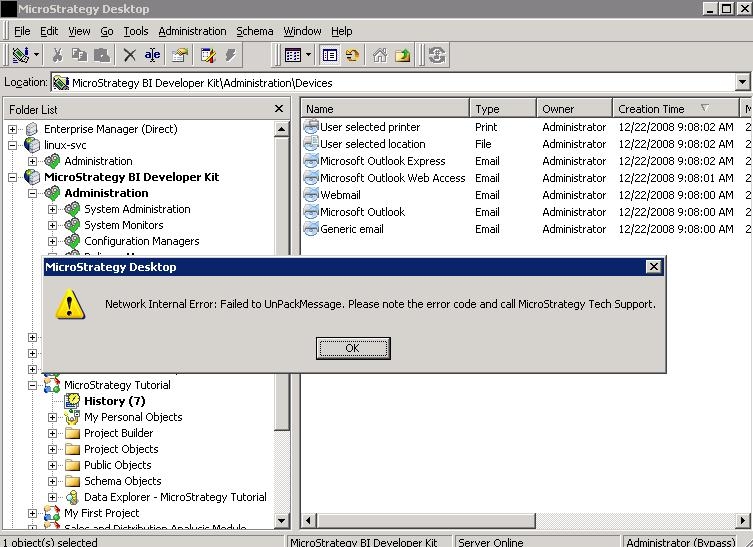
On Microsoft Windows, the following error occurs when trying to open the editor for a Print devicem, such as 'User selected printer':
 

ka04W000000OeUbQAK_0EM440000002B5Q.jpeg


Network Internal Error: Failed to UnPackMessage. Please note the error and call Strategy Tech Support.

 
 
CAUSE:
The Windows service 'Print Spooler' is not running:
 

ka04W000000OeUbQAK_0EM440000002B5W.jpeg

 
For more information on why the Print Spooler service may be stopped, consult the following Strategy Knowledge Base technical note:
KB20847: The 'Print Spooler' service is stopped, and the Startup Type is set to Manual, after upgrading, installing, or uninstalling Strategy 9.0.0 GA
 
ACTION:
Open the Windows Services manager and start the 'Print Spooler' service


Comment

0 comments

Details

Knowledge Article

Published:

June 9, 2017

Last Updated:

June 9, 2017