EducationSoftwareStrategy.com
StrategyCommunity

Knowledge Base

Product

Community

Knowledge Base

TopicsBrowse ArticlesDeveloper Zone

Product

Download SoftwareProduct DocumentationSecurity Hub

Education

Tutorial VideosSolution GalleryEducation courses

Community

GuidelinesGrandmastersEvents
x_social-icon_white.svglinkedin_social-icon_white.svg
Strategy logoCommunity

© Strategy Inc. All Rights Reserved.

LegalTerms of UsePrivacy Policy
  1. Home
  2. Topics

KB30349: 'Object variable or With block variable not set' error occurs when a metric for which an evaluation order has been set is removed from the grid and Report Data Options is trying to be opened thereafter in MicroStrategy Developer 9.x


Stefan Zepeda

Salesforce Solutions Architect • Strategy


SYMPTOM:
When removing a metric in Strategy Developer 9.x for which an evaluation order has been set is removed from the grid and placed in the Report Objects Window the following error message occurs when trying to go to the Data menu Report Data Options:
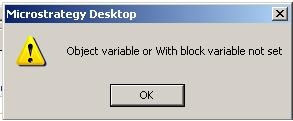
 

ka02R000000kXzWQAU_0EM440000002ETR.jpeg

 
Sample Code/Error
Object variable or With block variable not set
 
 
STEPS TO REPRODUCE:
To reproduce this issue in Strategy Tutorial execute the following steps:
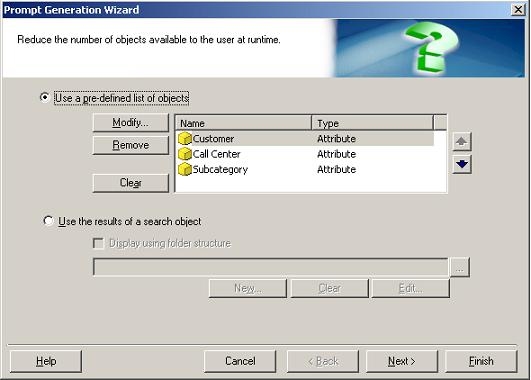
 

  1. Create two object prompts. One object prompt will contain attributes and the second object prompt will have metrics.
ka02R000000kXzWQAU_0EM440000002ETe.jpeg


  • Create a new report and add the new object prompt with attribute selections to the rows and the object prompt with metrics to the columns.
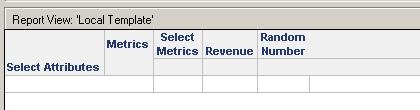
  • Add some additional metrics directly on the report template. (These should be metrics which are not included as options within the metrics object prompt)
ka02R000000kXzWQAU_0EM440000002ETP.jpeg


  • Go to Data menu -> Report Data Options -> Calcualtions -> Evaluation Order. Uncheck the box that says `Show consolidations only (6.x evaluation order)'
  • Change the evaluation order for the metrics in the prompt. The order is not important.
  • Click OK.
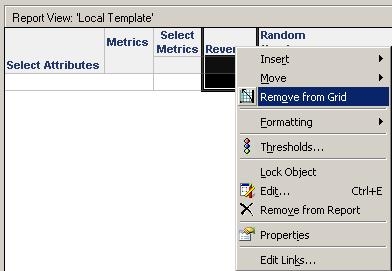
  • Now, remove from the grid each of the indiviudual metrics that you added on step 3.
ka02R000000kXzWQAU_0EM440000002ETU.jpeg

 
CAUSE:
This is a known issue in Strategy Developer 9.x.
 
ACTION:
Contact Strategy Technical Support for an update regarding this issue.

  • Go to Data -> Report Data Options again and you will receive the error message as stated above.

Comment

0 comments

Details

Knowledge Article

Published:

June 12, 2017

Last Updated:

June 12, 2017