EducationSoftwareStrategy.com
StrategyCommunity

Knowledge Base

Product

Community

Knowledge Base

TopicsBrowse ArticlesDeveloper Zone

Product

Download SoftwareProduct DocumentationSecurity Hub

Education

Tutorial VideosSolution GalleryEducation courses

Community

GuidelinesGrandmastersEvents
x_social-icon_white.svglinkedin_social-icon_white.svg
Strategy logoCommunity

© Strategy Inc. All Rights Reserved.

LegalTerms of UsePrivacy Policy
  1. Home
  2. Topics

KB303511: MicroStrategy Narrowcast Administrator 10.4 crashes when trying to Configure Sources


Community Admin

• Strategy


The issue described in this document has been classified as a defect by MicroStrategy.  Users may encounter an error while trying to configure Narrowcast in MicroStrategy 10.4.  A solution/code fix for this issue is available in current releases.  A workaround is also provided in this document.

SUMMARY:
The issue described in this document has been classified as a defect by Strategy.  Users may encounter an error while trying to configure Narrowcast in Strategy 10.4.  A solution/code fix for this issue is available in current releases.  A workaround is also provided in this document.
 
SYMPTOM:
In Strategy 10.4, Narrowcast Administrator crashes when trying to Configure Sources in the System Configuration Wizard.
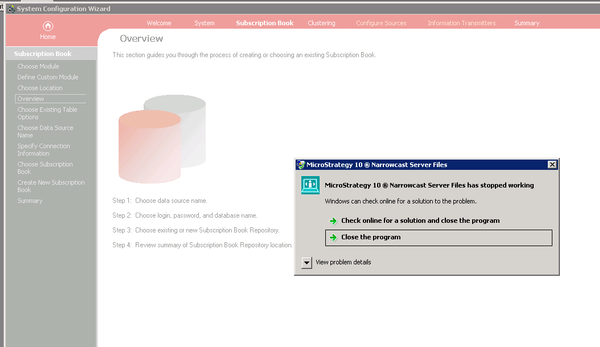
ka04W000000OhnPQAS_0EM4400000029BO.jpeg


Strategy 10 Narrowcast Server Files has stopped working
Windows can check online for a solution to the problem.

 
Users may also seen an Automation error.

ka04W000000OhnPQAS_0EM4400000029BL.jpeg


Automation error
The object invoked has disconnected from its clients.


CAUSE:
This is an identified defect in Strategy Narrowcast Administrator 10.4.
 
ACTION:
This issue has been addressed in Strategy Narrowcast Administrator 10.4 Hotfix 1 and 10.5. Upgrade to that version to take advantage of this fix.
 
WORKAROUND:
Modify the JVM heap size with the following steps:

  • Close Narrowcast Administrator.
  • Select Start > Run and type regedit to launch the Registry Editor.
  • Navigate to HKEY_LOCAL_MACHINE\SOFTWARE\Wow6432Node\MicroStrategy\JNI Bridge\Configuration\JVM Options.
  • Modify HeapMaxSize to a smaller value (such as 256M).
ka04W000000OhnPQAS_0EM4400000029BM.jpeg
  • Re-open Narrowcast Administrator and test to see if the error still occurs.

Note: JNI Bridge 64 does not need to be changed.


Comment

0 comments

Details

Knowledge Article

Published:

April 13, 2017

Last Updated:

April 13, 2017