EducationSoftwareStrategy.com
StrategyCommunity

Knowledge Base

Product

Community

Knowledge Base

TopicsBrowse ArticlesDeveloper Zone

Product

Download SoftwareProduct DocumentationSecurity Hub

Education

Tutorial VideosSolution GalleryEducation courses

Community

GuidelinesGrandmastersEvents
x_social-icon_white.svglinkedin_social-icon_white.svg
Strategy logoCommunity

© Strategy Inc. All Rights Reserved.

LegalTerms of UsePrivacy Policy
  1. Home
  2. Topics

KB30355: How to optimize custom MDX expressions using query-scoped named sets in MicroStrategy Engine


Community Admin

• Strategy


Compound metrics defined in an MDX cube that are based on a custom MDX expression may need to include set expressions to define the scope of the calculation. For instance, a metric may use a prompt to select months or quarters, and then evaluate the average over the day-level values belonging to the prompt selection.

Compound metrics defined in an MDX cube that are based on a custom MDX expression may need to include set expressions to define the scope of the calculation. For instance, a metric may use a prompt to select months or quarters, and then evaluate the average over the day-level values belonging to the prompt selection.
 
In this example, "Attributes of the Date hierarchy" is a hierarchy prompt using the Date hierarchy of a Microsoft Analysis Services 2005 cube. Generate() is required because the user could choose more than one element; this function obtains the Day-level descendents of each user selection.
 

ka04W000000OhjiQAC_0EM440000002EUH.gif

 
ApplySimple("Avg(Generate({ #0 }, Descendants(..CurrentMember, ..)), #1)", ?, Revenue)
 
This metric is used in a report such as the following, which generates the MDX statement below.
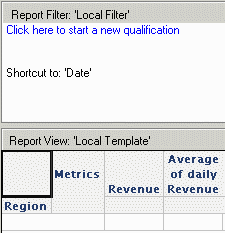
 

ka04W000000OhjiQAC_0EM440000002EUD.gif

 
with set as '{...members}'
member . as 'Avg(Generate({ ...& }, Descendants(..CurrentMember, ..)), .)'
select {., .} on columns,
non empty on rows
from
where (...&)
cell properties CELL_ORDINAL, FORMATTED_VALUE, VALUE, FORMAT_STRING
 

ka04W000000OhjiQAC_0EM440000002EUJ.gif

 
A source of inefficiency in this query, particularly against Microsoft Analysis Services, is that . needs to be evaluated for every item on the row axis in the select clause, which may cause the Generate function to reevaluate for each cell. But in this formula, the Generate expression does not depend on the selected items in any way; its result will be the same for every iteration. It would be more efficient to evaluate the set once, and use a reference to it in .'s expression.
 
Beginning with Strategy Engine 9.0.0, this is accomplished by placing the delimiter %%SET%% before and after the portion of the expression to isolate as a named set.
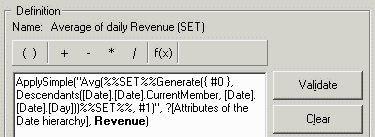
 

ka04W000000OhjiQAC_0EM440000002EUA.gif

 
ApplySimple("Avg(%%SET%%Generate({ #0 }, Descendants(..CurrentMember, ..))%%SET%%, #1)", ?, Revenue)
 
With this modification to the metric, the MDX now generates with an additional set declaration within the query:
 
with set as '{...members}'
set as 'Generate({ ...& }, Descendants(..CurrentMember, ..))'
member . as 'Avg(, .)'
select {., .} on columns,
non empty on rows
from
where (...&)
cell properties CELL_ORDINAL, FORMATTED_VALUE, VALUE, FORMAT_STRING
 
will evaluate once at the beginning of query execution.
 
Notes
  • This optimization is valid only for sets that do not depend on the current attribute elements being evaluated -- i.e., .CurrentMember. Even though the above Generate() expression uses CurrentMember, it evaluates correctly because CurrentMember operates within the scope of the Generate function, where the scope comes from the left-hand argument (in this example, a specific member of the hierarchy). If CurrentMember is used in a context where it takes its scope from the SELECT clause, the metric will not return correct results. The reason is that the metric expression, taken as a whole, depends on the cell being evaluated, but a named set expression evaluates only once. Thus, the named set result could not be correct per cell.
     
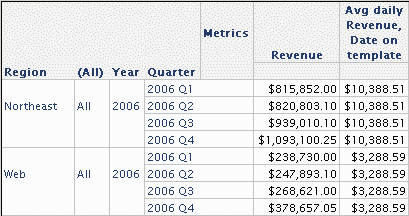
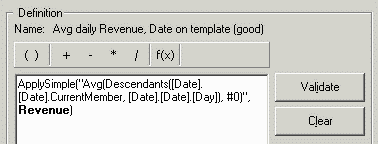
    For example, defining the average metric to take the average over day-level data for the current template member of the Date hierarchy produces a different average revenue per quarter.
     
ka04W000000OhjiQAC_0EM440000002EU6.gif
  • ApplySimple("Avg(Descendants(..CurrentMember, ..), #0)", Revenue)

ka04W000000OhjiQAC_0EM440000002EU5.gif
  •  
    Using the SET optimization for this metric produces the same, incorrect average for every quarter, because Member_Set1 is not able to evaluate separately for each quarter.
     
ka04W000000OhjiQAC_0EM440000002EU9.gif
  • ApplySimple("Avg(%%SET%%Descendants(..CurrentMember, ..)%%SET%%, #0)", Revenue)

ka04W000000OhjiQAC_0EM440000002EU7.gif
  •  
    Thus, if incorrect results are obtained using the SET optimization, try removing the optimization to see if this corrects the results. If so, then the optimization is not valid for that case.
     
  • Only one %%SET%%...%%SET%% expression is allowed per compound metric. By nesting one compound metric inside another, it may be possible to use one %%SET%%...%%SET%% expression in each metric and thereby have a pair of set definitions contributing to one template metric.
  • Currently, identical set expressions are not shared across metrics. A separate will be generated for each metric.
  • The %%SET%% delimiter must appear as a pair. If the delimiter is opened but never closed, %%SET%% will be written into the MDX statement and will cause a syntax error during execution.

Comment

0 comments

Details

Knowledge Article

Published:

April 18, 2017

Last Updated:

April 18, 2017