EducationSoftwareStrategy.com
StrategyCommunity

Knowledge Base

Product

Community

Knowledge Base

TopicsBrowse ArticlesDeveloper Zone

Product

Download SoftwareProduct DocumentationSecurity Hub

Education

Tutorial VideosSolution GalleryEducation courses

Community

GuidelinesGrandmastersEvents
x_social-icon_white.svglinkedin_social-icon_white.svg
Strategy logoCommunity

© Strategy Inc. All Rights Reserved.

LegalTerms of UsePrivacy Policy
  1. Home
  2. Topics

KB30361: How to use a custom MDX expression to refer to predefined named sets in Microsoft SQL Server Analysis Services cubes in MicroStrategy Engine 10.x


Community Admin

• Strategy


How to use a custom MDX expression to refer to predefined named sets in Microsoft SQL Server Analysis Services cubes in MicroStrategy Engine 10.x

Named sets defined in a Microsoft SQL Server Analysis Services cube are not imported with the cube structure and are not available directly for filtering in Strategy 10.x reports. The import of named sets is logged with Strategy Technology for consideration for a future release.
 
If the named set exists over a single attribute, however, it is possible to use a custom MDX metric to test attribute elements for membership in the named set. Strategy reports can then use the metric for filtering.
 
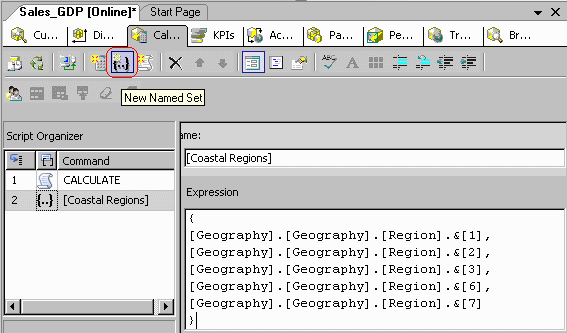
Consider a very simple named set defined as follows.
 

ka04W000000OhMJQA0_0EM440000002ETl.gif

 
{
   ...&,
   ...&,
   ...&,
   ...&,
   ...&
}
 
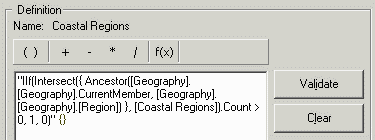
To use the set for filtering in Strategy 10.x, create a compound metric in the cube such as the following:
 

ka04W000000OhMJQA0_0EM440000002ETj.gif

 
"IIf(Intersect({ Ancestor(..CurrentMember, ..) }, ).Count > 0, 1, 0)" {}
 
Abstractly:
 
"IIf(Intersect({ Ancestor(..CurrentMember, ..) }, ).Count > 0, 1, 0)" {}
 
Notes on this metric formula

  • MDX does not have a dedicated function to test whether a hierarchy member belongs to a set. The standard technique is to intersect the member being tested with the set. If the intersection result has no elements (i.e., its count is 0), then the member lies outside the set.
     
  • Ancestor() is used because a report might use a child of Region on the template. In that case, ..CurrentMember would exist at a lower level than Region. Since the sample named set includes only Region members, it is necessary to raise the current member to the level of Region.
     
    Note, however, that the filter design recommended below explicitly sets the filtering level of the metric qualification to Region. If every report uses this style of filter, the metric formula could be simplified to the following.
     
    "IIf(Intersect({ ..CurrentMember }, ).Count > 0, 1, 0)" {}
     
    The simpler form may execute more quickly in the database; but, if the user creates an ad hoc report at a level lower than Region and uses a simple metric qualification without specifying the filtering level, the report would return no data. It may be safer, then, to use the Ancestor formula.
     
  • The formula does not need to worry about Descendants, because this would imply a filter at a lower level than the template. This scenario is not supported in MDX reports, as discussed in the following Strategy Knowledgebase article.
     
    KB16979: 'The child of an attribute in the template may not be used to restrict the data' error appears when executing an OLAP cube report in Strategy 8.x

Filtering using the named set metric
 
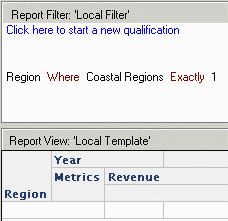
It is generally recommended to use an attribute-level metric qualification to control the attribute elements passed into the filter.
 

ka04W000000OhMJQA0_0EM440000002ETg.gif


Comment

0 comments

Details

Knowledge Article

Published:

May 24, 2017

Last Updated:

May 24, 2017