SYMPTOM
Using the MultiSource option in Strategy Architect 9.x, a user imports several tables from more than one database. In this example, two Database Instances are used. Both contain identical LU_Attribute tables; these are imported as a single logical table enabled for both databases (as indicated by the MultiSource icon). Fact1 exists only in WH1, and Fact2 exists only in WH2. The two fact tables contain different facts, but the ID column for the same attribute as in LU_Attribute.
Re-build app(s) using Xcode | DESC (varchar) |
DESC (varchar) | Fact1 (double) |
Fact1 (double) | Fact2 (double) |
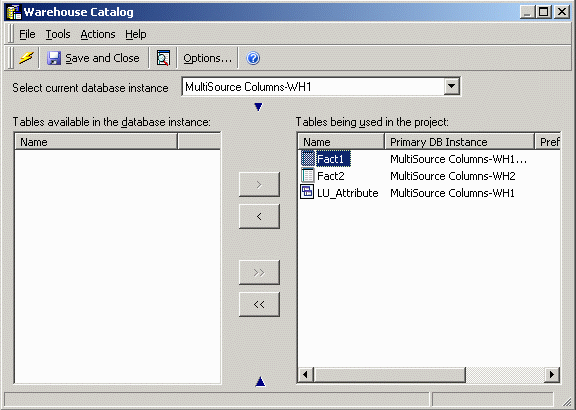
However, when the user attempts to create the attribute for the lookup table, only WH1's tables are available for mapping.
First, the ID column is chosen from the lookup table (whose primary Database Instance is WH1).
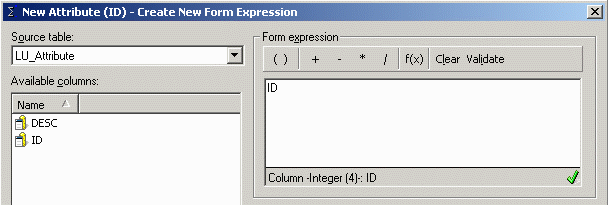
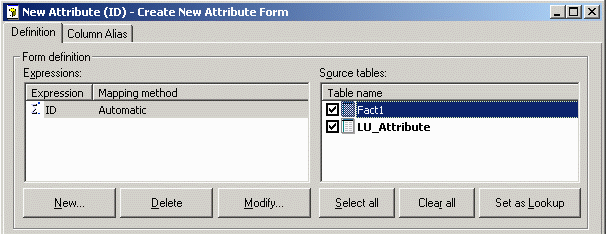
After accepting the form expression by clicking OK, only LU_Attribute and Fact1 appear in the Source tables panel. The Fact2 table also supports the attribute, but it is not available for selection.
CAUSE
The root cause is that more than one column alias has been created in the Strategy metadata for identically-named columns in different databases. Each of the distinct column aliases is associated with a subset of the possible tables, where each table group belongs to one Database Instance. This can be seen by going to the Column Alias tab and clicking the Select button to view the available column aliases.
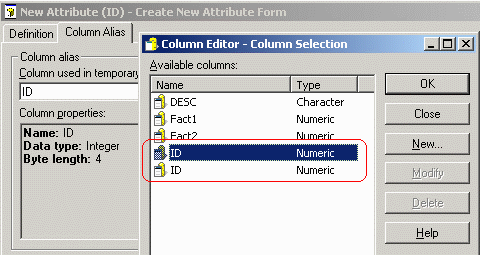
Strategy expressions encode direct links to metadata objects. In the above scenario, the expression "ID" is a reference to the ID column alias object that belongs to LU_Attribute and Fact1. Even though the ID column from Fact2 has the same name, it is represented in the Strategy metadata by a separate object that has no connection to the other two tables. Hence, Fact2 does not appear for the first ID column reference.
If, instead, the ID column were dragged into the form expression from the Fact2 table, then the only this table would be available for mapping to that form expression and LU_Attribute and Fact1 would be missing.
Two possible causes of this situation are:
Other scenarios may exist, but have not been identified.
ACTION
This issue is logged with the Strategy Technology department for review. Contact Strategy Technical Support for an update on the status of this issue.
To avoid the issue, it is recommended to import tables in the Warehouse Catalog from one Database Instance at a time, saving the changes for each separately.
WORKAROUND
If identical columns were imported from multiple databases in the same Warehouse Catalog operation, the redundant columns may be removed from the Strategy metadata using the following procedure.
Note: If the additional columns exist because of compatible (but not identical) data types, the procedure may not resolve the issue.
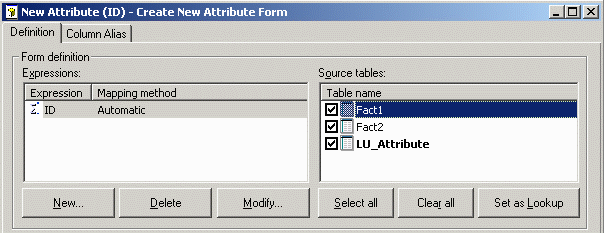
A quicker workaround is to create a second attribute form or fact expression using the alternate column object. The redundancy will appear in the editor, but SQL generation and report execution should be unaffected. This approach may be preferred in cases where it is undesirable to remove and re-create schema object mappings.
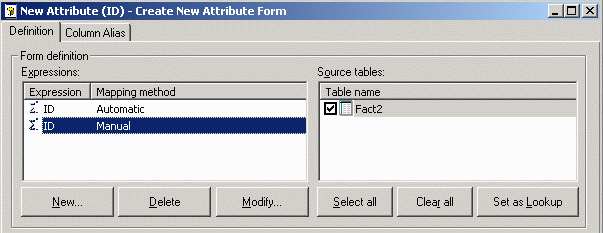
This form expression differs from the earlier form expression in that its source table is Fact2, not LU_Attribute.
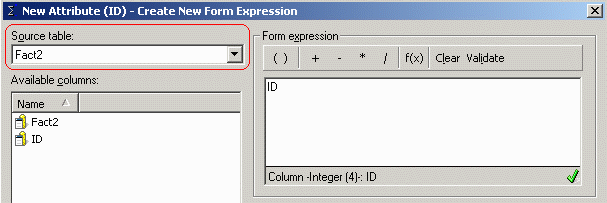
This leaves a pair of "ID" form expressions in the same attribute, both of which are associated with a different group of logical tables. By normal Strategy Engine rules for heterogeneous column mapping, both expressions will be treated as equivalent in table joins.