SYMPTOM:
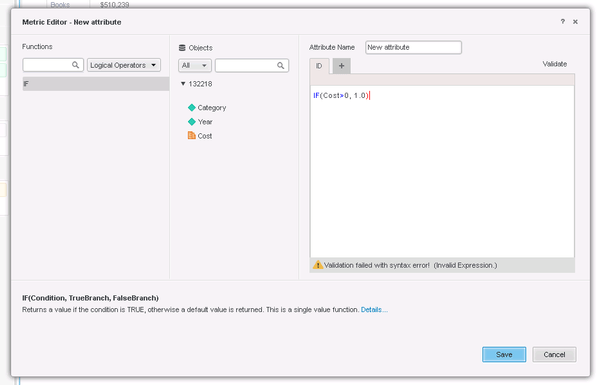
When creating a derived attribute in Strategy Web 10.3 within a Visual Insight dashboard, the formula will not validate successfully and gives an error "Validation failed with syntax error! (Invalid Expression)". This metric cannot be saved until the formula is corrected so it can successfully validate. This has only been identified to happen for some functions such as the IF and CASE functions.
STEPS TO REPRODUCE
1) Create a derived attribute in Web
2) Type the following in the expression: IF((Cost > 100), 1.0, 0.0)
3) Click validate and see that the expression is valid.
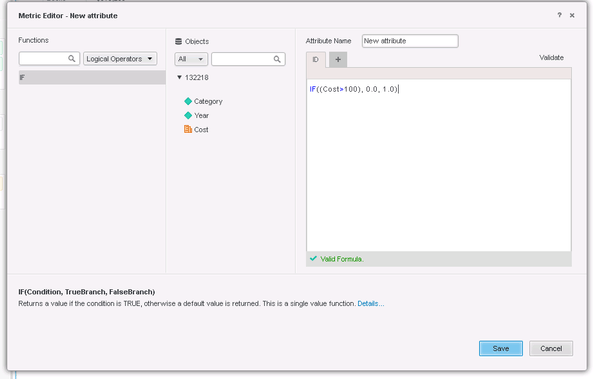
4) Clear the expression and use the formula editor and navigate to the logical operators, IF function and click Edit
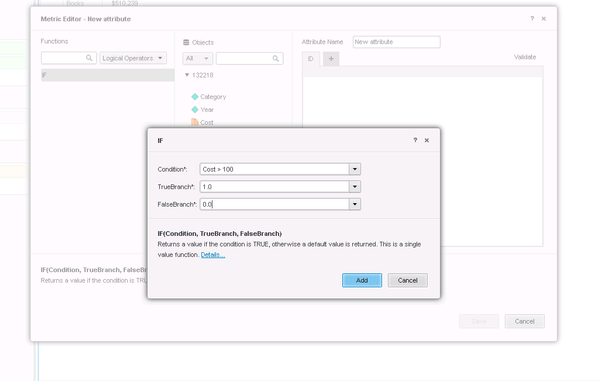
5) Select a metric such as Cost and enter > 100 in the Condition
6) Enter constants in the TrueBranch and FalseBranch, such as 1.0 and 0.0 respectively
7) Click Finish and see that an incorrect expression is entered such as: IF( [Cost > 100], 1.0, 0.0)
CAUSE:
This has been identified as a defect in Strategy Web 10.3.
ACTION:
Currently this issue is still being reviewed for feasibility by our Technology team and it is not scoped for any upcoming scheduled Strategy release.
WORKAROUND:
Instead of using the formula editor, type in the formula expression manually and it will validate successfully.
Please contact Strategy Technical support for further details.
