EducationSoftwareStrategy.com
StrategyCommunity

Knowledge Base

Product

Community

Knowledge Base

TopicsBrowse ArticlesDeveloper Zone

Product

Download SoftwareProduct DocumentationSecurity Hub

Education

Tutorial VideosSolution GalleryEducation courses

Community

GuidelinesGrandmastersEvents
x_social-icon_white.svglinkedin_social-icon_white.svg
Strategy logoCommunity

© Strategy Inc. All Rights Reserved.

LegalTerms of UsePrivacy Policy
  1. Home
  2. Topics

KB30385: When attempting to populate a temporary table in a Microsoft Excel database a 'Cannot modify the design of table XXX. It is in a read-only database' error is thrown.


Community Admin

• Strategy


When trying to populate a temporary table in Microsoft Excel, the error below is thrown:Cannot modify the design of table XXX. It is in a read-only database.

SYMPTOM
When trying to populate a temporary table in Microsoft Excel, the error below is thrown:


ka04W000000OhDWQA0_0EM440000002JI7.jpeg

 
Sample Code/Error
Cannot modify the design of table XXX. It is in a read-only database.
 
 
CAUSE
The Data Source Name used to connect to the Microsoft Excel database is set to Read Only, therefore its not possible to create a temporary table and write data into it.
 
ACTION
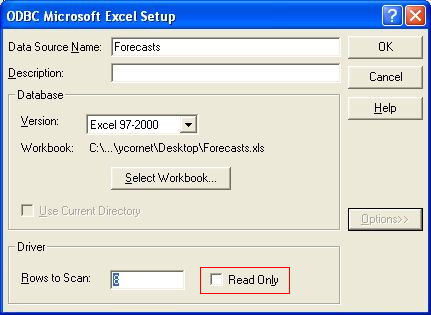
  1. Open the ODBC Data Source Administrator located under Control Panel > Administrative Tools > Data Sources (ODBC).
  2. Go to the System DSN tab and locate the DSN used to connect to the Microsoft Excel database and click Configure.
  3. Select Options and uncheck the Read Only check box.


ka04W000000OhDWQA0_0EM440000002JI5.jpeg


Comment

0 comments

Details

Knowledge Article

Published:

May 30, 2017

Last Updated:

May 30, 2017