EducationSoftwareStrategy.com
StrategyCommunity

Knowledge Base

Product

Community

Knowledge Base

TopicsBrowse ArticlesDeveloper Zone

Product

Download SoftwareProduct DocumentationSecurity Hub

Education

Tutorial VideosSolution GalleryEducation courses

Community

GuidelinesGrandmastersEvents
x_social-icon_white.svglinkedin_social-icon_white.svg
Strategy logoCommunity

© Strategy Inc. All Rights Reserved.

LegalTerms of UsePrivacy Policy
  1. Home
  2. Topics

KB30409: Report filters are being ignored in MicroStrategy Developer 9.x and 10.x


Stefan Zepeda

Salesforce Solutions Architect • Strategy


This article discusses a scenario where filters are not applied to a report in the way an end user may expect.  This occurs when there are both report and metric filters involved in the MicroStrategy report.

SUMMARY:
This article discusses a scenario where filters are not applied to a report in the way an end user may expect.  This occurs when there are both report and metric filters involved in the Strategy report.
SYMPTOM:
When users run a report using a simple filter, the filter is not applied to the report in Strategy Developer 9.x and 10.x. The results returned to the users are not filtered as expected. The Report SQL indicates that the filter has not been applied.
CAUSE:
One scenario is that the Strategy 10.x SQL Engine is ignoring the conditionality at the report level because a metric in the report also contains a related conditionality which has been set to "remove related report filter elements" or "ignore" the filtering criteria at the report level.
 
ACTION:
When a report contains the above situation, the follow steps can be done to have both filters applied and be merged for the report results to be executed with:
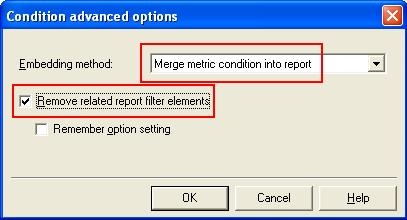
  • If the report's and metric's filter affect attributes from the same hierarchy, check that the following setting is un-checked:
     
ka02R000000kcZeQAI_0EM440000002ET5.jpeg
  •  
    This setting is placed in the metric editor, condition section, advanced button.
     
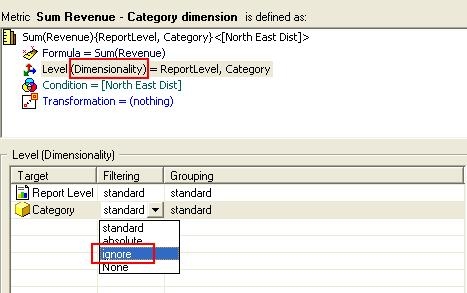
  • If the metrics have dimensionality assigned, ensure that the metrics are NOT set to ignore the filtering criteria in the dimensionality section of the metric editor:
     
ka02R000000kcZeQAI_0EM440000002ET3.jpeg
  •  
    Ensure that the filtering option for the filtered attribute is NOT set to ignore.

Strategy will ignore all the unrelated filters for the metric calculation. If a fact does not exist at a certain level, the SQL Engine will ignore that filter when calculating the aggregation for the fact.
 
Further information regarding Conditional Metrics in Strategy, refer to the Advanced Reporting Guide of the Strategy Product Manuals.


Comment

0 comments

Details

Knowledge Article

Published:

April 11, 2017

Last Updated:

April 11, 2017