EducationSoftwareStrategy.com
StrategyCommunity

Knowledge Base

Product

Community

Knowledge Base

TopicsBrowse ArticlesDeveloper Zone

Product

Download SoftwareProduct DocumentationSecurity Hub

Education

Tutorial VideosSolution GalleryEducation courses

Community

GuidelinesGrandmastersEvents
x_social-icon_white.svglinkedin_social-icon_white.svg
Strategy logoCommunity

© Strategy Inc. All Rights Reserved.

LegalTerms of UsePrivacy Policy
  1. Home
  2. Topics

KB30466: How to drill to a template via a metric in the Graph View of a report in MicroStrategy Developer 9.x


Stefan Zepeda

Salesforce Solutions Architect • Strategy


How to drill to a template via a metric in the Graph View of a report in MicroStrategy Developer 9.x

INTRODUCTION
In Strategy 9.x, it is possible to create a drill path to a template via a metric. The metric can either be a simple metric or a compound metric.
 
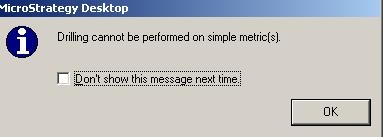
There is a known issue, when the user executes the report in graph view mode and tries to drill on a template via a simple metric, the following message appears:
 

ka02R000000kboXQAQ_0EM440000002CWz.jpeg

 
Sample Code/Error
Drilling cannot be performed on simple metric(s).
 
 
This issue occurs with reports executed in graph view mode in Strategy 9.x and has been logged with Strategy. There are two possible workarounds for this scenario:

  1. Convert the simple metric to a compound metric and then add it to the report.
  2. Execute the report in grid view mode and then drill to the template via the simple metric.

The following steps describe the first workaround - How to drill to a template via a simple metric, converted to a compound metric, in the graph view of a report:
 

ka02R000000kboXQAQ_0EM440000002CWw.jpeg

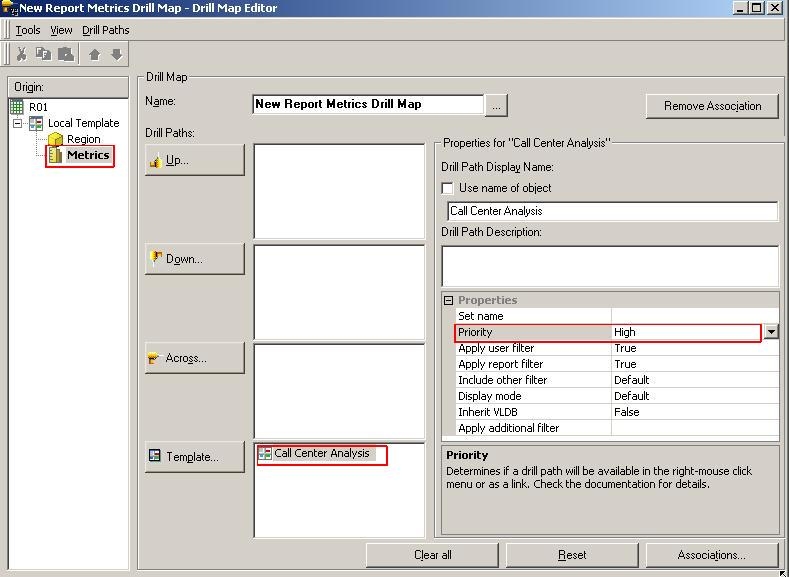
Note: Drilling in graph view is only possible by double-clicking on the metric. For this the priority of the drill path must be set to High as seen above.
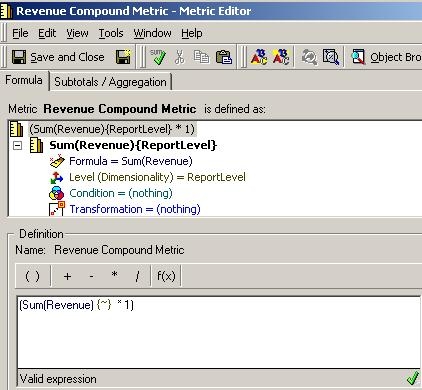
  • Create a metric called "New Revenue" with the following metric definition, thereby converting a simple Revenue metric into a compound metric.
ka02R000000kboXQAQ_0EM440000002CX0.jpeg
  • Create a report with attribute Region and metrics Profit and New Revenue (created in Step 1).
  • Within the report editor go to Data >Edit Drill Map and create a drill map for metrics to drill to 'Call Center Analysis' template. In Strategy 9.x the drill map will look like this:
  • Save and close the report.
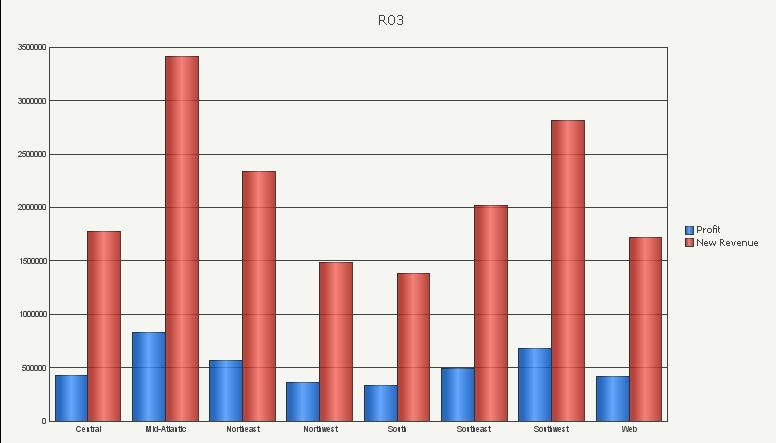
  • Execute the report in Graph View and the following results are displayed:
ka02R000000kboXQAQ_0EM440000002CXF.jpeg


  • Double click on metric "New Revenue" in the legend area to drill to the selected template.

Comment

0 comments

Details

Knowledge Article

Published:

June 8, 2017

Last Updated:

June 8, 2017