EducationSoftwareStrategy.com
StrategyCommunity

Knowledge Base

Product

Community

Knowledge Base

TopicsBrowse ArticlesDeveloper Zone

Product

Download SoftwareProduct DocumentationSecurity Hub

Education

Tutorial VideosSolution GalleryEducation courses

Community

GuidelinesGrandmastersEvents
x_social-icon_white.svglinkedin_social-icon_white.svg
Strategy logoCommunity

© Strategy Inc. All Rights Reserved.

LegalTerms of UsePrivacy Policy
  1. Home
  2. Topics

KB30472: How to use an MDX Cube report as a filter in a SQL report using the Multisource option in MicroStrategy Engine


Community Admin

• Strategy


The Multisource reporting option in MicroStrategy Engine 9.x and 10.x includes the ability to use an MDX Cube report as a filter in a relational SQL report.

The Multisource reporting option in Strategy Engine 9.x and 10.x includes the ability to use an MDX Cube report as a filter in a relational SQL report.
 
The following procedure configures an MDX data source for filtering use.
  • MDX Cube attributes in the filtering MDX report must be mapped onto project attributes. Any cube attributes used on the template of the filtering report that are not mapped to project attributes will be ignored when the filter is applied in SQL. Consult the following Strategy Knowledgebase article for details on mapping cube attributes. The procedure is the same in Strategy 9.0.0 as in Strategy 8.1.x.
     
    KB17125: How to map MDX Cube attributes onto normal project attributes in MicroStrategy Desktop 9.x
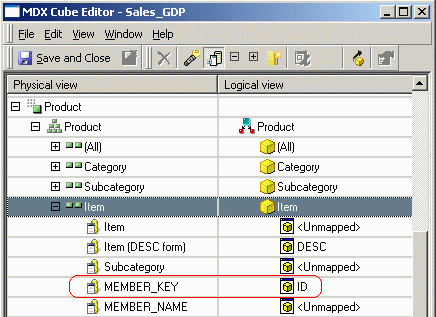
  • It is especially important to map the correct cube column onto the attribute's ID form. The data in that column must match the IDs in the warehouse. This is discussed in KB17125. Since this cube comes from Microsoft SQL Server Analysis Services 2005, MEMBER_KEY is the correct column for the ID.
     
ka04W00000148pIQAQ_0EM440000002ESr.gif
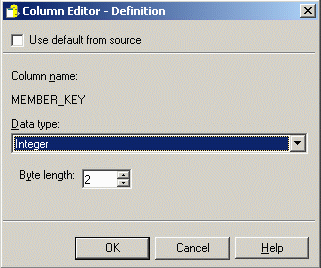
  • The data type for this column is changed to match the data type for the ID form's column alias.
     
ka04W00000148pIQAQ_0EM440000002ESo.gif
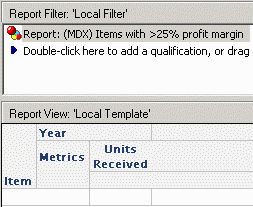
  • The MDX report may have any valid construction. Generally it is recommended to use only attributes that are mapped into the project. If a cube-only attribute is present in the template, it will influence the report's results (for instance, by affecting the aggregation level of metric qualifications), but the cube-only attribute will not join to the SQL report and will not directly apply. If, for example, the MDX filtering report included Year on the template, the filter would pass items whose profit margin in any single year exceeds 25%. The report as shown, without Year, considers each item's profit margins over all years in the warehouse taken together.
     
ka04W00000148pIQAQ_0EM440000002ESm.gif
ka04W00000148pIQAQ_0EM440000002ESn.gif
  • Adding the MDX report as a filter is the same as adding a SQL report as a filter: Drag the report into the Report Filter panel.
     
ka04W00000148pIQAQ_0EM440000002ESu.gif
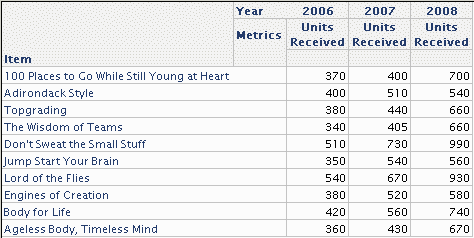
  • The results include only the items returned by the MDX report.
     
ka04W00000148pIQAQ_0EM440000002ESl.gif

The SQL view shows how the feature operates. The MDX results are selected into Strategy Intelligence Server memory, and the relevant filtering attribute IDs are inserted into an intermediate table in the data warehouse. This intermediate table is joined to the fact table to apply the filter to the main report.
 
Sql
Pass0 -  
 Duration: 0:00:04.28
 Rows selected: 10
with set as '{...members}'
member . as '(. / .)'
set as 'Filter(, . >= 0.25)'
set as '{Generate(, {..CurrentMember})}'
select {.} on columns,
non empty hierarchize({}) dimension properties MEMBER_KEY on rows
from
cell properties CELL_ORDINAL, FORMATTED_VALUE, VALUE, FORMAT_STRING
 
Pass1 -  
 Duration: 0:00:00.07
create table #ZZTUQ00009UOP000(
 ITEM_ID SMALLINT)
 
Pass2 -  
 Duration: 0:00:00.03
 Rows inserted: 10
insert into #ZZTUQ00009UOP000 values (1)
 
Pass3 -  
 Duration: 0:00:00.04
 Rows selected: 30
select a11.ITEM_ID  ITEM_ID,
 max(a14.ITEM_NAME)  ITEM_NAME0,
 a13.YEAR_ID  YEAR_ID,
 sum(a11.UNITS_RECEIVED)  WJXBFS1
from INVENTORY_ORDERS a11
 join #ZZTUQ00009UOP000 pa12
   on  (a11.ITEM_ID = pa12.ITEM_ID)
 join LU_MONTH a13
   on  (a11.MONTH_ID = a13.MONTH_ID)
 join LU_ITEM a14
   on  (a11.ITEM_ID = a14.ITEM_ID)
group by a11.ITEM_ID,
 a13.YEAR_ID
 
Notes
The only type of report in Strategy that allows reports to be used as filters is a standard relational report. Extended Data Access reports have not supported report-as-filter since their introduction in Strategy 8.0.0. Extended Data Access includes Freeform SQL, Query Builder and MDX reports. The reason for this restriction is that using a report as filter requires the creation of an intermediate table, hence, multipass SQL. Freeform SQL and Query Builder reports are, by definition, single pass and cannot incorporate reports as filters. The MDX language does not include the capability to create and insert arbitrary data into an intermediate table. Therefore, MDX reports can also not use reports as filters.
 
To use an MDX report as a filter in a SQL report, the Strategy Multisource option must be installed and the user running the report must have the privilege to execute reports against multiple data sources.
 
The Multisource option does not support combining attributes and metrics from SQL and MDX into the same report.


Comment

0 comments

Details

Knowledge Article

Published:

April 17, 2017

Last Updated:

August 12, 2021