SYMPTOM
When users use Strategy Configuration Wizard 9.0 to create new metadata tables or to configure the Strategy Intelligence Server, some system DSNs are grayed out as shown below. Upon selecting a grayed out DSN, it is not possible to click on the 'next' button to proceed with the next steps.

CAUSE
DSNs configured against databases which are not supported for metadata are grayed out on Strategy Configuration Wizard 9.0. If users mouse-over on the grayed out DSN's they would see a note that those DSNs are not supported for the repository (metadata) being configured, as shown below.
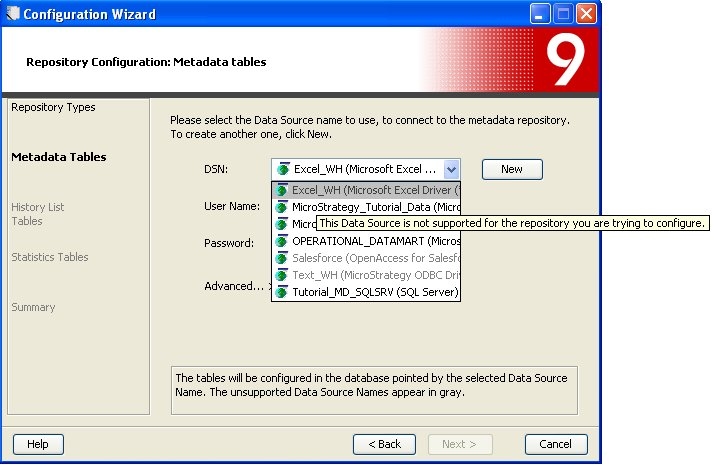
Note: In Strategy Configuration Wizard 8.x, DSNs configured against databases not supported for a repository would not appear in the drop down list of DSNs.
ACTION
Make sure that the DSN trying to be be used on Strategy Configuration Wizard 9.0 is pointing to a database that is supported for a repository. Refer to the Strategy Readme > Supported and Certfied Configurations section for information about databases that are supported for the metadata.
