EducationSoftwareStrategy.com
StrategyCommunity

Knowledge Base

Product

Community

Knowledge Base

TopicsBrowse ArticlesDeveloper Zone

Product

Download SoftwareProduct DocumentationSecurity Hub

Education

Tutorial VideosSolution GalleryEducation courses

Community

GuidelinesGrandmastersEvents
x_social-icon_white.svglinkedin_social-icon_white.svg
Strategy logoCommunity

© Strategy Inc. All Rights Reserved.

LegalTerms of UsePrivacy Policy
  1. Home
  2. Topics

KB30488: In MicroStrategy ScanMD Step 2, after clicking "Next", the user cannot proceed to Step 3


Community Admin

• Strategy


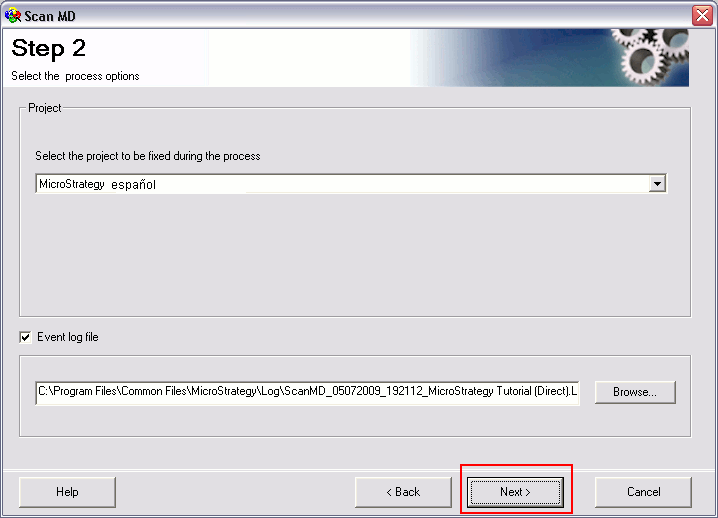
In MicroStrategy ScanMD Step 2, after the user clicks on "Next", the application does not move to Step 3 to display available fixes and tests if the project name contains non-English characters.

SYMPTOM:
In Strategy ScanMD Step 2, after the user clicks on "Next", the application does not move to Step 3 to display available fixes and tests. See the screenshot below:
 

ka04W000000OeqgQAC_0EM440000002ESx.gif

 
NOTE: The application does not hang. The user can close the application without any issue.
 
CAUSE:
The selected project name contains non-English characters (as shown above) which cannot be recognized by the ScanMD.
 
ACTION:
To resolve the issue, the user can temporarily rename the project through the Strategy Developer.


Comment

0 comments

Details

Knowledge Article

Published:

June 5, 2017

Last Updated:

June 5, 2017