EducationSoftwareStrategy.com
StrategyCommunity

Knowledge Base

Product

Community

Knowledge Base

TopicsBrowse ArticlesDeveloper Zone

Product

Download SoftwareProduct DocumentationSecurity Hub

Education

Tutorial VideosSolution GalleryEducation courses

Community

GuidelinesGrandmastersEvents
x_social-icon_white.svglinkedin_social-icon_white.svg
Strategy logoCommunity

© Strategy Inc. All Rights Reserved.

LegalTerms of UsePrivacy Policy
  1. Home
  2. Topics

KB30516: "View Options..." option is disabled for different system monitors in the Administration section of a 3-tier project source in MicroStrategy Developer 9.x and 10.x


Stefan Zepeda

Salesforce Solutions Architect • Strategy


KB30516: "View Options..." option is disabled for different system monitors in the Administration section of a 3-tier project source in MicroStrategy Developer 9.x and 10.x

SYMPTOM:
In the Administration section of a 3-tier project source in Strategy Developer 9.x and 10.x, the "View Options..." context menu item for the following system monitors is disabled:

  • History List Messages
  • Chage Journal Transactions
  • Jobs
ka02R000000kXtcQAE_0EM440000002ERQ.jpeg

 
CAUSE:
The "View Options..." menu item is disabled because the "List" option has been selected in the Strategy Developer 9.x and 10.x View menu:
 

ka02R000000kXtcQAE_0EM440000002ER3.jpeg

 
ACTION:
In order to enable the "View Options..." menu item, select "Details" from the Strategy Developer 9.x and 10.x View menu:
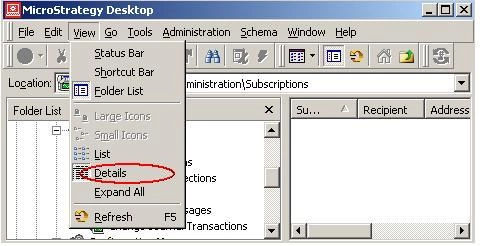
 

ka02R000000kXtcQAE_0EM440000002ERS.jpeg


Comment

0 comments

Details

Knowledge Article

Published:

June 13, 2017

Last Updated:

June 13, 2017