EducationSoftwareStrategy.com
StrategyCommunity

Knowledge Base

Product

Community

Knowledge Base

TopicsBrowse ArticlesDeveloper Zone

Product

Download SoftwareProduct DocumentationSecurity Hub

Education

Tutorial VideosSolution GalleryEducation courses

Community

GuidelinesGrandmastersEvents
x_social-icon_white.svglinkedin_social-icon_white.svg
Strategy logoCommunity

© Strategy Inc. All Rights Reserved.

LegalTerms of UsePrivacy Policy
  1. Home
  2. Topics

KB30538: "[Error:FetchScroll failed. [Adaptive Server IQ]When Force_No_Scroll_Cursors = ON, scrolling cursor operations are not supported by Sybase IQ]" error message appears with Sybase IQ database on MicroStrategy 10.x


Stefan Zepeda

Salesforce Solutions Architect • Strategy


This article describes how to resolve an error "Error:FetchScroll failed. [Adaptive Server IQ]When Force_No_Scroll_Cursors = ON ..." encountered when running a MicroStrategy report or document against Sybase IQ

SYMPTOM:
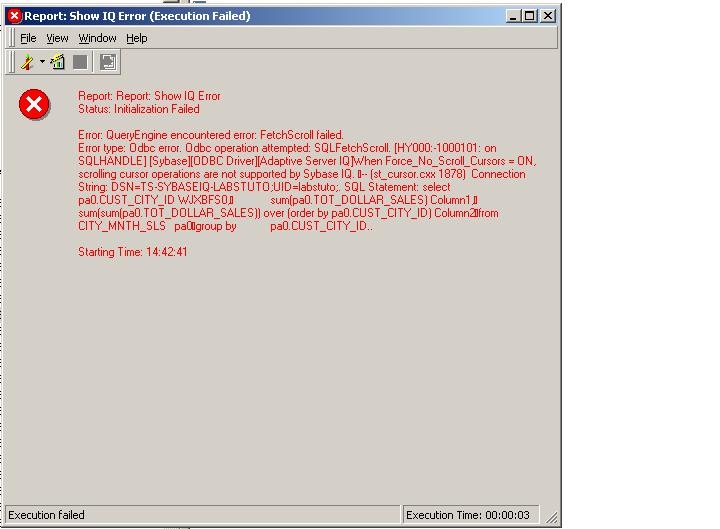
 Users who have Sybase IQ as a data warehouse may encounter the following error during report execution:
 

ka04W000001IvPrQAK_0EM440000002ESO.jpeg


Error: QueryEngine encountered error: FetchScroll failed.
Error type: Odbc error. Odbc operation attempted: SQLFetchScroll. When Force_No_Scroll_Cursors = ON, scrolling cursor operations are not supported by Sybase IQ
 
 
CAUSE:
This error is related to the change in the ODBC version used from  Strategy version 9 onwards.  By default, Strategy 10.x  will use the 3.x ODBC calls during SQL execution for existing Sybase IQ database instances.  When a database instance is set to use 3.x ODBC calls the Strategy query engine uses the SQLFetchScroll function to fetch back data from the database.  The SQLFetchScroll function is not supported by SybaseIQ when the Force_No_Scroll_Cursors option is enabled.
 
ACTION:
There are 3 options to make the report execute without the error message:
 

  • Change the database by setting to OFF the Force_No_Scroll_Cursors option.  By default this option is turned ON.  Ask the Sybase IQ database administrator to change the option to Force_No_Scroll_Cursors = OFF.
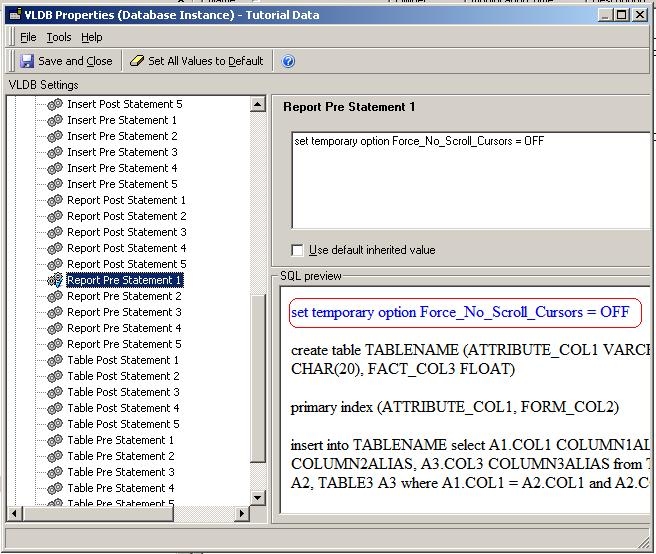
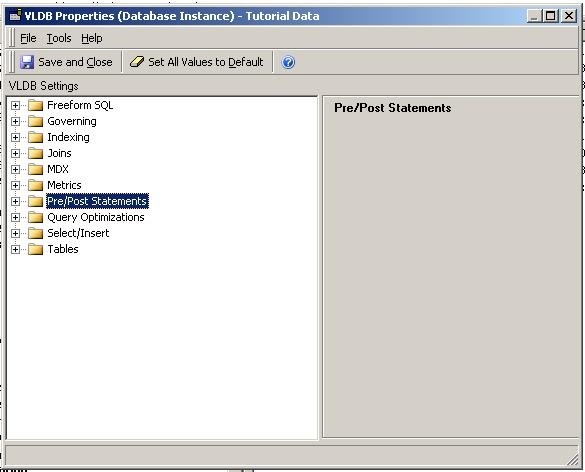
  • Set the option to OFF via a Sybase IQ set statement using the Strategy VLDB setting for Pre/Post Statements ’Report Pre Statement 1’.  The set statement to use is “set temporary option Force_No_Scroll_Cursors = OFF”.


ka04W000001IvPrQAK_0EM440000002ESS.jpeg


ka04W000001IvPrQAK_0EM440000002ESM.jpeg


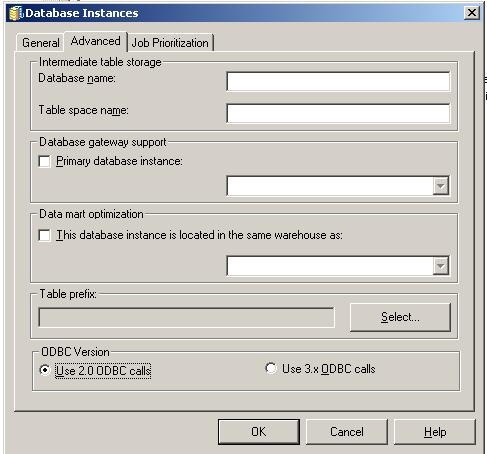
  • Change the Database Instance to use 2.0 ODBC calls instead of the default value of 3.x.


ka04W000001IvPrQAK_0EM440000002ESB.jpeg


Comment

0 comments

Details

Knowledge Article

Published:

June 12, 2017

Last Updated:

May 13, 2022