EducationSoftwareStrategy.com
StrategyCommunity

Knowledge Base

Product

Community

Knowledge Base

TopicsBrowse ArticlesDeveloper Zone

Product

Download SoftwareProduct DocumentationSecurity Hub

Education

Tutorial VideosSolution GalleryEducation courses

Community

GuidelinesGrandmastersEvents
x_social-icon_white.svglinkedin_social-icon_white.svg
Strategy logoCommunity

© Strategy Inc. All Rights Reserved.

LegalTerms of UsePrivacy Policy
  1. Home
  2. Topics

KB30569: Sorting on metric values does not work if they are placed in the Detail Header section of a Report Services document in MicroStrategy Developer 9.x and 10.x


Stefan Zepeda

Salesforce Solutions Architect • Strategy


KB30569: Sorting on metric values does not work if they are placed in the Detail Header section of a Report Services document in MicroStrategy Developer 9.x and 10.x

Users may notice that sorting does not work on metric values if they are placed in the header section a Report Services document.
 
STEPS TO REPRODUCE:
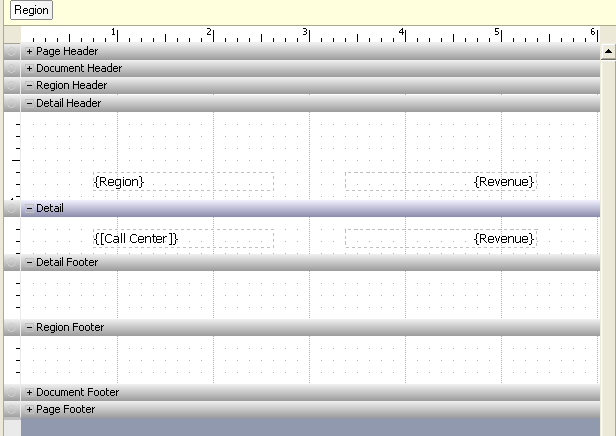
  • Create a simple report with attributes Region and Call Center, and the metric Revenue.
  • Include the above report in a document.  Add Region and Revenue as dynamic text fields in the Detail Header.
  • Add Call Center and Revenue to the Detail section.
  • Place Region in the Grouping section.  The document should now look like the image below:

ka02R000000kY3HQAU_0EM440000002ERe.jpeg
  • Go to Data --> Sorting, and sort Revenue in descending order.
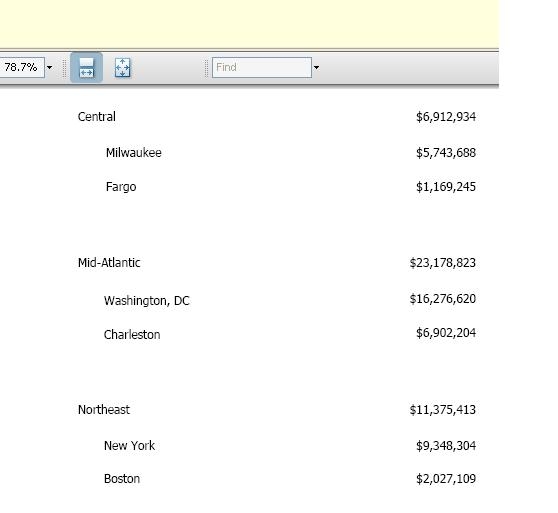
  • Execute the document.  Notice that the values in the Detail section are sorted but the values in the Detail Header section are not sorted.  In the example below, Central, Mid-Atlantic, and Northeast are the Regions, while the indented lines are the call centers.  For each Region, the call centers are sorted in descending order, however the Regions themselves are not sorted, i.e. Central should be at the bottom, as it has the lowest Revenue.

ka02R000000kY3HQAU_0EM440000002ERd.jpeg

 
CAUSE:
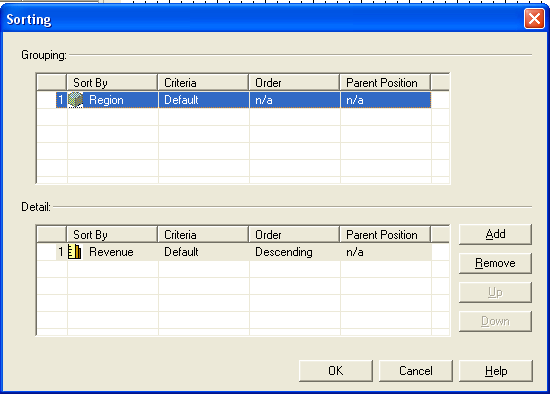
This issue is caused due to the structure of the sorting architecture. The sorting definition of the document above is shown below:
 

ka02R000000kY3HQAU_0EM440000002ERi.jpeg

 
There are only two sorting sections defined, Grouping and Detail. The sort definition for the Detail section has no effect on the Detail Header section. Typically there is only one row of data for the Detail Header when there is no grouping defined, hence the sorting functionality is not present for the Detail Header Section. If a user adds one or more attributes to the Grouping section, there are multiple Detail Headers, but each of them still has only one row of data.   Thus, the detail header order defaults to the normal display (by ID), giving the appearance of being unsorted.


Comment

0 comments

Details

Knowledge Article

Published:

June 12, 2017

Last Updated:

June 12, 2017