EducationSoftwareStrategy.com
StrategyCommunity

Knowledge Base

Product

Community

Knowledge Base

TopicsBrowse ArticlesDeveloper Zone

Product

Download SoftwareProduct DocumentationSecurity Hub

Education

Tutorial VideosSolution GalleryEducation courses

Community

GuidelinesGrandmastersEvents
x_social-icon_white.svglinkedin_social-icon_white.svg
Strategy logoCommunity

© Strategy Inc. All Rights Reserved.

LegalTerms of UsePrivacy Policy
  1. Home
  2. Topics

KB30581: How to subscribe other users to reports with MicroStrategy Distribution Services


Community Admin

• Strategy


In Strategy 9.0.0, there is a new functionality within Strategy Distribution Services 9.0.0 which allows a user to subscribe other users to reports. However, when attempting to subscribe reports for other users, User A cannot see any other Strategy users to subscribe reports for, and can only send reports to his/her own email address:


To subscribe other users to reports with Strategy Distribution Services 9.0.0, the user must have the correct privileges at the project level as shown below:
 
 
These include:

  1. Web Reporter
    1. Web drill and link
    2. Web re-execute report against warehouse
    3. Web simultaneous execution
    4. Web user
    5. Web view history list
  2. Web Professional
    1. Web subscribe others
  3. Common Privileges
    1. Schedule request
    2. Use server cache
  4. Distribution Services
    1. Create email address
    2. Subscribe to email
    3. Use distribution services


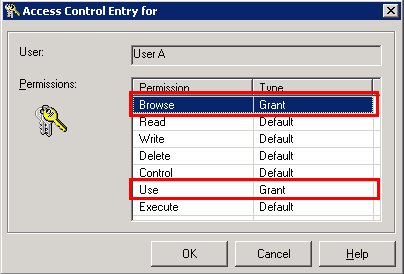
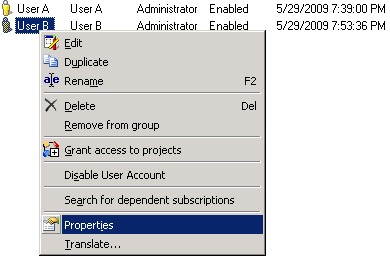
Additionally, User A must have the appropriate Browse and Use privileges set on User B's ACL, as shown below: 
 

ka04W000000rZPpQAM_0EM440000002VPm.jpeg


ka04W000000rZPpQAM_0EM440000002VPy.jpeg

 
User A must have the Browse permission in order to see User B in the list of recipients for the subscription, and the Use permission is needed in order to use User B.
 
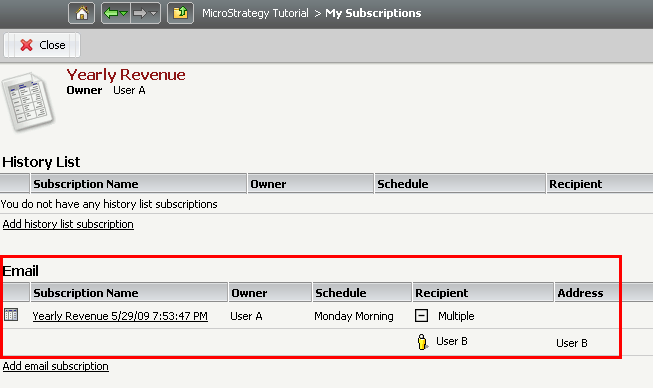
Upon granting the above privileges and permissions, User A will now be able to see User B and subscribe User B to reports:


ka04W000000rZPpQAM_0EM440000002VPl.jpeg


Comment

0 comments

Details

Knowledge Article

Published:

July 28, 2017

Last Updated:

July 28, 2017