In Strategy Enterprise Manager 9.x, there is new setting in the Strategy Enterprise Manager Console 9.x that allows the SQL executed during the Strategy Enterprise Manager 9.x data load process to be logged.
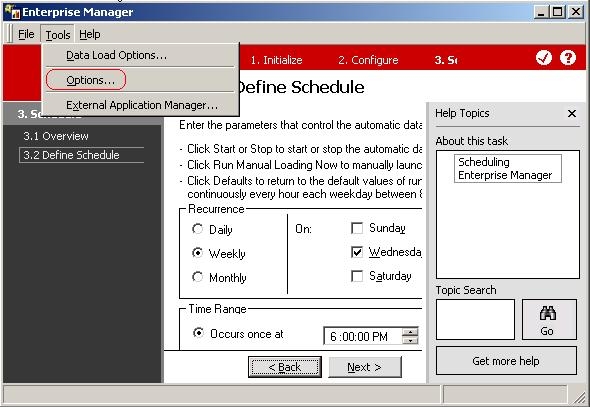
Open the Strategy Enterprise Manager Console 9.x and go to Tools > Options:
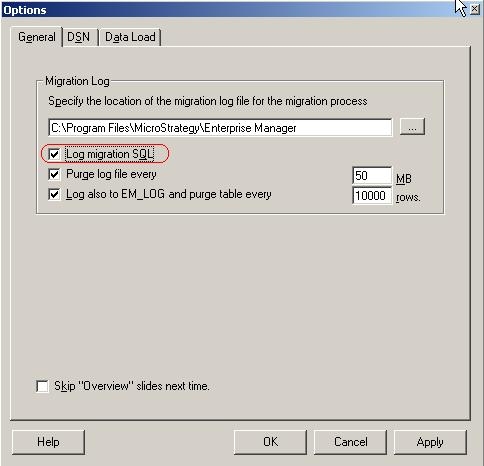
Under the 'General' tab, check the option for 'Log migration SQL':
NOTE: For Strategy Enterprise Manager 8.1.x refer to the following Strategy Knowledge Base technical note:
KB13980: How to view the SQL executed during the Strategy Enterprise Manager 8.1.x data loading (ETL) process
NOTE: It is recommended to uncheck the Log SQL option once the testing / troubleshooting has completed and the SQL logging is no longer required. This will prevent the MSTRMigration.log from growing unecessarly large in size.
Enterprise Manager Warehouse Modification WARNING
Manually editing values in the Strategy Enterprise Manager Warehouse incorrectly may cause serious, project-wide problems that may make your Strategy Enterprise Manager project and dataload unusable. Since these are user-initiated changes, they are not covered by any Strategy warranty. Users are strongly encouraged to not modify the Strategy Enterprise Manager Warehouse; if changes are made users are strongly encouraged to backup the database prior to any alteration.
