EducationSoftwareStrategy.com
StrategyCommunity

Knowledge Base

Product

Community

Knowledge Base

TopicsBrowse ArticlesDeveloper Zone

Product

Download SoftwareProduct DocumentationSecurity Hub

Education

Tutorial VideosSolution GalleryEducation courses

Community

GuidelinesGrandmastersEvents
x_social-icon_white.svglinkedin_social-icon_white.svg
Strategy logoCommunity

© Strategy Inc. All Rights Reserved.

LegalTerms of UsePrivacy Policy
  1. Home
  2. Topics

KB30612: "[InstallShield Silent] Version=v7.00 File=Log File [ResponseResult] ResultCode=-3" message appears in the setup-v9.log file when performing a silent installation of MicroStrategy 9.x


Community Admin

• Strategy


"[InstallShield Silent] Version=v7.00 File=Log File [ResponseResult] ResultCode=-3" message appears in the setup-v9.log file when performing a silent installation of MicroStrategy 9.x

SYMPTOM:
Users receive the following status message in the setup-v9.log file at the end of a silent installation of Strategy 9.0 performed by using a setup-v9.iss file and response.ini file which seem to be correctly configured:


Version=v7.00
File=Log File

ResultCode=-3

 
Usually a 'ResultCode = -3' message means that the required data was not found in the setup.iss file and as a result, the procedure to modify the installation does not install the additional components. But when users double-check the .iss file and response.ini file everything is correctly configured.
 
CAUSE:
One possible reason for the 'ResultCode = -3' message would be that system were Strategy is being installed does not comply with some prerequisites for the products that were set to be installed in the response.ini file.
Examples of the prerequisites could be:

  • No Adobe Acrobat Reader installed.
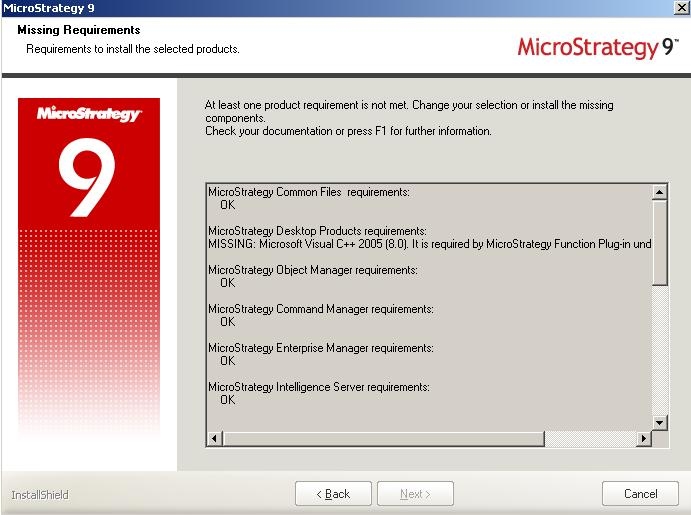
  • Missing C++ libraries for Architect Function Plugin.

ACTION:
If possible, users should try a graphical user interface (GUI) installation with the same language settings and products chosen for the silent installation. This will help users figure out if some prerequisites are not being met.
 
The GUI installation will display a Missing Requirements window for any prerequisites that are not met according to the products that were selected to be installed. Some pop-up windows may also display for users to know any prerequisites not being met.  Once users found the missing prerequisites, they can cancel the GUI installation and no products will be installed.
ka04W000000Ocg4QAC_0EM440000002WtR.jpeg

Comment

0 comments

Details

Knowledge Article

Published:

July 18, 2017

Last Updated:

July 18, 2017