EducationSoftwareStrategy.com
StrategyCommunity

Knowledge Base

Product

Community

Knowledge Base

TopicsBrowse ArticlesDeveloper Zone

Product

Download SoftwareProduct DocumentationSecurity Hub

Education

Tutorial VideosSolution GalleryEducation courses

Community

GuidelinesGrandmastersEvents
x_social-icon_white.svglinkedin_social-icon_white.svg
Strategy logoCommunity

© Strategy Inc. All Rights Reserved.

LegalTerms of UsePrivacy Policy
  1. Home
  2. Topics

KB30614: How to find out when a subscription for a report was created in MicroStrategy Enterprise Manager


Community Admin

• Strategy


Strategy Enterprise Manager does not directly record the date of subscription creation. However, in order to estimate when a report was originally scheduled within Strategy Developer and Web, Enterprise Manager can be utilized to display the first instance of job execution initiated by the schedule.  By identifying the execution time a range can be established of when the report or document was originally subscribed to the schedule, based on the frequency that the schedule is triggered.
 
The following objects can be used on a Strategy Enterprise Manager report to display the first report execution time; it can be modified to apply to documents as well by replacing the Report attribute with the Document attribute.
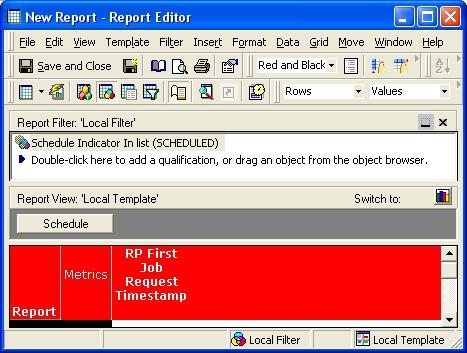
 

  1. In Strategy Enterprise Manager, create a new report.
  2. Add the Report attribute to the rows.
  3. Add the metric "RP First Job Request Timestamp" to the columns.
  4. Add the Schedule attribute to the page-by.
  5. Add the "Schedule Indicator" attribute to the filter, with In List condition of Scheduled.


ka04W000000OePAQA0_0EM440000002B5B.jpeg

 
Executing the newly created report will display reports associated with the selected schedule and the first time that they were ever requested by the schedule for execution.


Comment

0 comments

Details

Knowledge Article

Published:

June 9, 2017

Last Updated:

June 9, 2017