EducationSoftwareStrategy.com
StrategyCommunity

Knowledge Base

Product

Community

Knowledge Base

TopicsBrowse ArticlesDeveloper Zone

Product

Download SoftwareProduct DocumentationSecurity Hub

Education

Tutorial VideosSolution GalleryEducation courses

Community

GuidelinesGrandmastersEvents
x_social-icon_white.svglinkedin_social-icon_white.svg
Strategy logoCommunity

© Strategy Inc. All Rights Reserved.

LegalTerms of UsePrivacy Policy
  1. Home
  2. Topics

KB30639: Custom Time Data Format dd:hh:mm:ss used to display data in days, hours, minutes, and seconds does not return expected results when the time stored is less than a day in length.


Stefan Zepeda

Salesforce Solutions Architect • Strategy


SYMPTOM:
When displaying time data using custom format dd:hh:mm:ss it returns ########## in grid reports when the data stored is less than a day long. This time data is a length of time and not a datetime.
STEPS TO REPRODUCE:
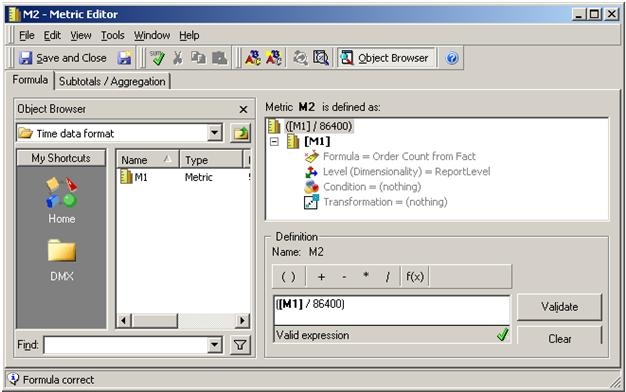
  • Create metric M1 that stores data in seconds.
  • Create a new metric M2 = M1 / 86400, where 86400 = number of seconds in a day.  
     
ka04W000001IvYGQA0_0EM440000002EMg.jpeg
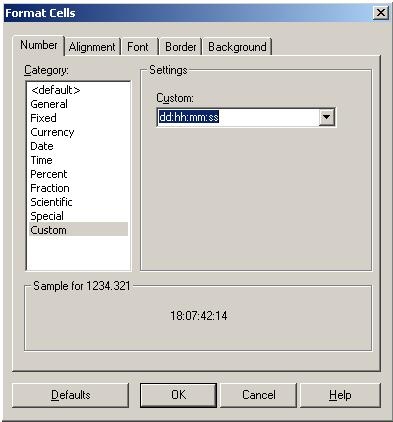
  • Apply custom format :mm:ss to M2.    
     
ka04W000001IvYGQA0_0EM440000002EMi.jpeg
  • Create a report R1 with an attribute and the metric M2.
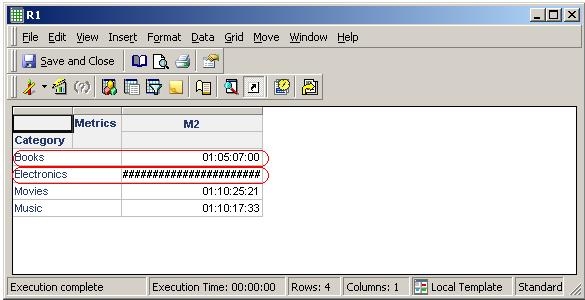
  • Execute report R1. Notice that M2 values are displayed correctly if the data stored is in excess of one day but, M2 values are displayed as  ########## if the data stored is less than a day.    
     
ka04W000001IvYGQA0_0EM440000002EMd.jpeg

CAUSE:
This is a known issue in Strategy 9.x
ACTION:
Contact Strategy Technical Support for an update on  this issue.
 
WORKAROUND:
Use the custom formatting
 
[<1]"00"\:hh:mm:ss;[>=1]dd:hh:mm:ss; to display in days, hours, minutes, and seconds.


Comment

0 comments

Details

Knowledge Article

Published:

April 13, 2017

Last Updated:

May 24, 2022