EducationSoftwareStrategy.com
StrategyCommunity

Knowledge Base

Product

Community

Knowledge Base

TopicsBrowse ArticlesDeveloper Zone

Product

Download SoftwareProduct DocumentationSecurity Hub

Education

Tutorial VideosSolution GalleryEducation courses

Community

GuidelinesGrandmastersEvents
x_social-icon_white.svglinkedin_social-icon_white.svg
Strategy logoCommunity

© Strategy Inc. All Rights Reserved.

LegalTerms of UsePrivacy Policy
  1. Home
  2. Topics

KB30704: How to find the full Project Duplication errors if the message is truncated within the GUI in MicroStrategy 10.x


Community Admin

• Strategy


This Technical Note describes how to find the full Project Duplication errors if the message is truncated within the GUI in MicroStrategy 10.x

SYMPTOM:
Errors that exceed 100 characters are truncated within the Project Duplication GUI as shown below:
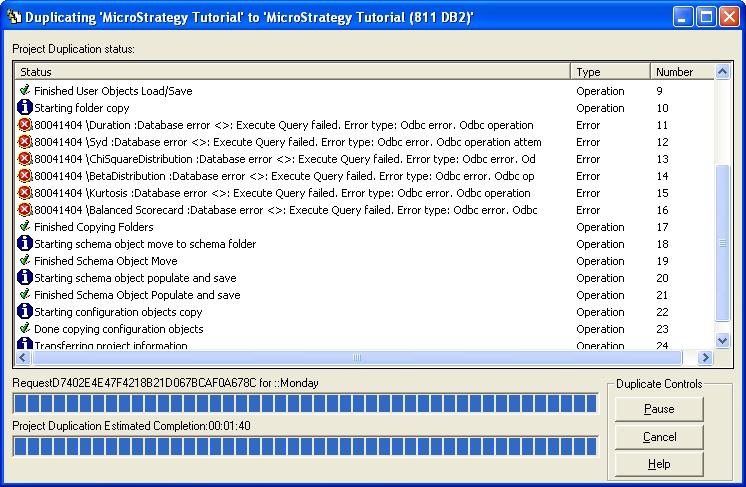
ka04W000000OhkzQAC_0EM440000002ER0.jpeg

 
ACTION:
Find the entire error message in any of the following logs:

  1. The DSSErrors.log
  2. The Duplicate.log (C:\Program Files\Common Files\Strategy)
  3. DuplicateCorruptedObjects.log (C:\Program Files\Common Files\Strategy)

From the example above, the logs are not truncated by the character length restrictions:
Sample Code/Error
\Duration :Database error <>: Execute Query failed. Error type: Odbc error. Odbc operation attempted: SQLExecDirect. Character data, right truncation occurred; for example, an update or insert value is a string that is too long for the column, or a datetime value cannot be assigned to a host variable, because it is too small. (Data: Returns the Macauley duration for an assumed par value of $1).


Comment

0 comments

Details

Knowledge Article

Published:

April 16, 2017

Last Updated:

April 16, 2017