EducationSoftwareStrategy.com
StrategyCommunity

Knowledge Base

Product

Community

Knowledge Base

TopicsBrowse ArticlesDeveloper Zone

Product

Download SoftwareProduct DocumentationSecurity Hub

Education

Tutorial VideosSolution GalleryEducation courses

Community

GuidelinesGrandmastersEvents
x_social-icon_white.svglinkedin_social-icon_white.svg
Strategy logoCommunity

© Strategy Inc. All Rights Reserved.

LegalTerms of UsePrivacy Policy
  1. Home
  2. Topics

KB307268: "You do not have Read access to the DB Instance object 'xxx'" error when trying to create an MDX Cube Report in MicroStrategy Developer 10.x


Stefan Zepeda

Salesforce Solutions Architect • Strategy


The issue described in this document has been classified as a defect by MicroStrategy.  The issue occurs in MicroStrategy Developer 10.x when trying to create a report based on an MDX data source.  A solution/code fix is not available in current releases, but is being reviewed for a future MicroStrategy release. 

SUMMARY:
The issue described in this document has been classified as a defect by Strategy.  The issue occurs in Strategy Developer 10.x when trying to create a report based on an MDX data source.  A solution/code fix is not available in current releases, but is being reviewed for a future Strategy release. 
 
DESCRIPTION:
In Strategy Developer 10.x, users may encounter the following error when trying to create a report based on an MDX data source.
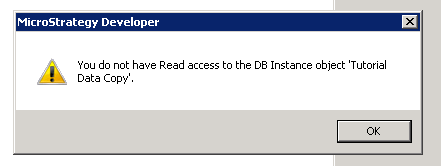
ka02R000000kVEUQA2_0EM440000002C1J.jpeg


You do not have Read access to the DB Instance object 'xxx'.
 
STEPS TO REPRODUCE:

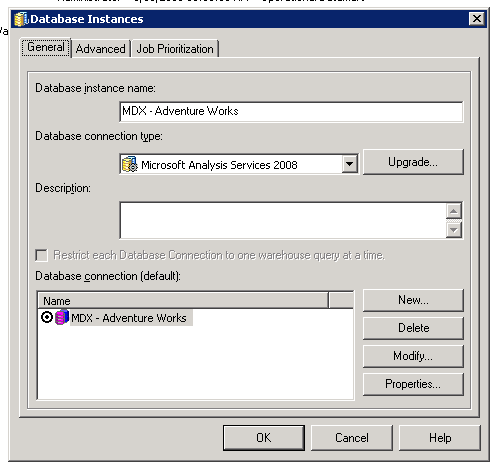
  • In Developer, create a database instance based on an MDX data source.
ka02R000000kVEUQA2_0EM440000002C1K.jpeg
  • Open the Strategy Tutorial project in Developer, go to Schema > MDX Cube Catalog and import an MDX Cube into the project.
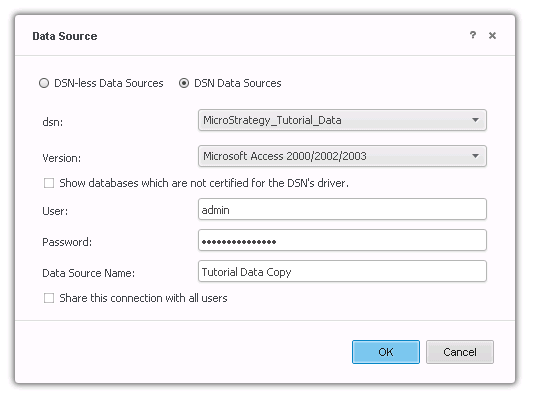
  • In Web, create a new data import database instance. Do not check the box for "Share this connection with all users".
ka02R000000kVEUQA2_0EM440000002C1N.jpeg
  • In Developer, log in as a user who does not have the privilege "Bypass all object security access checks".
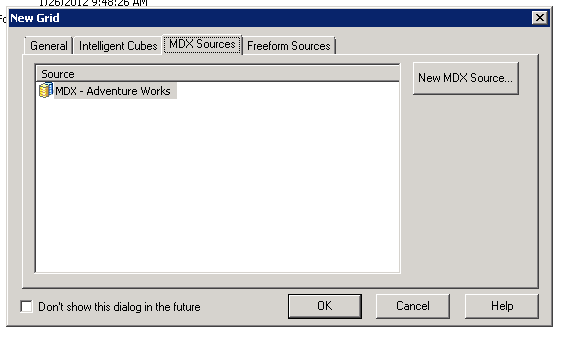
  • Right-click and choose New > Report. Then click on the MDX Sources tab. Choose the MDX Database Instance from Step 1.
ka02R000000kVEUQA2_0EM440000002C1F.jpeg
  • The error "You do not have Read access to the DB Instance object 'xxx'" will appear.

 
CAUSE:
This is an identified defect in Strategy 10.x.
ACTION:
This issue has been addressed in 11.0. Upgrade to this version to take advantage of this fix.
WORKAROUND:
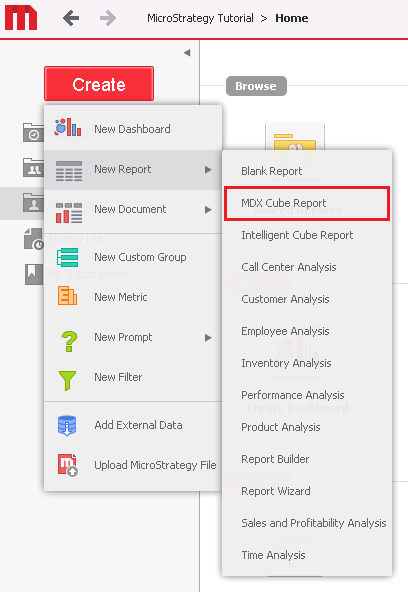
The ACL error message will not occur if users create the MDX report in Strategy Web.  Once the report has been created in Web, users can edit the report in Developer.
ka02R000000kVEUQA2_0EM440000002C1H.jpeg

 
The Strategy Internal Reference Number for the issue discussed in this technical note is DE43226.
KB413491


Comment

0 comments

Details

Knowledge Article

Published:

June 8, 2017

Last Updated:

August 29, 2018