Summary:
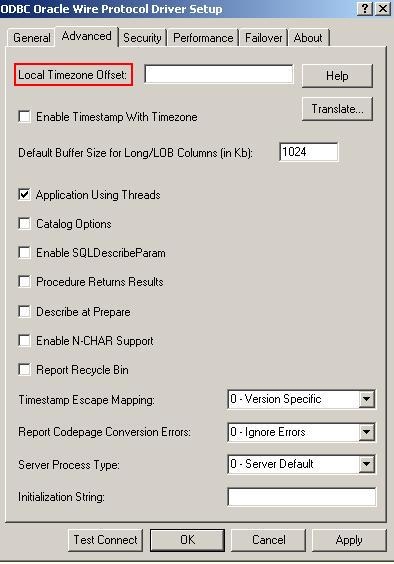
Local Timezone Offset provides the local timezone information for Strategy ODBC Driver for Oracle Wire Protocol. The default value for this parameter is "" (empty string).
On Windows, this means that the driver determines local time zone information from the operating system. If it is not available from the operating system, the driver defaults to using the setting on the Oracle server.
To set this parameter on Windows go to Microsoft ODBC Administrator and select the Oracle DSN (NOTE: The DSN should have been created initially using the Strategy Connectivity Wizard). Then click on Configure and go to the Advanced tab as seen below:
Valid values are specified as offsets from GMT as follows:
(-)HH:MM. For example,
-08:00equals GMT minus 8 hours. The driver uses the value of the option to issue an ALTER SESSION for the local time zone at connect time.
[Oracle Wire Protocol]
Driver=/home/njain/MSTR811_Linux_New/install/lib32/MYoraXX.so
Description=Strategy ODBC Driver for Oracle Wire Protocol
AlternateServers=
ApplicationUsingThreads=1
ArraySize=60000
AuthenticationMethod=1
CachedCursorLimit=32
CachedDescLimit=0
CatalogIncludesSynonyms=1
CatalogOptions=0
ConnectionRetryCount=0
ConnectionRetryDelay=3
DefaultLongDataBuffLen=1024
DescribeAtPrepare=0
EnableDescribeParam=1
EnableNcharSupport=0
EnableScrollableCursors=1
EnableStaticCursorsForLongData=0
EnableTimestampWithTimeZone=0
EncryptionMethod=0
GSSClient=native
HostName=oracleserver
HostNameInCertificate=
KeyPassword=
KeyStore=
KeyStorePassword
LoadBalancing=0
LocalTimeZoneOffset=
LockTimeOut=-1
LogonID=uid
Password=pwd
PortNumber=1521
ProcedureRetResults=0
ReportCodePageConversionErrors=0
ReportRecycleBin=0
ServerName=<server_name in tnsnames.ora only>
ServerType=0
ServiceName=
SID=oraclesid
TimestampeEscapeMapping=0
TNSNamesFile=<tnsnames.ora_filename>
TrustStore=
TrustStorePassword=
UseCurrentSchema=1
ValidateServerCertificate=0
WireProtocolMode=1
