Using Strategy OLAP Services 9.x-10.x, it is possible to apply security filters at the view report level. For information about general rules that apply when security filters are applied on view reports based on Intelligent Cubes, refer to the following Strategy Knowledge Base document:
KB30696: Overview of security filter application to view reports based on Intelligent Cubes in Strategy OLAP Services
This document discusses a specific case regarding how security filters are applied when there are OLAP function metrics in the Intelligent Cube.
The result of a metric containing an OLAP function not only depends on the input metrics on which the function is applied, but it also depends on the Break-by and Sort-by parameters defined. When a security filter is applied on an Intelligent Cube with OLAP function metrics, in addition to applying the basic rules (discussed in TN 30496) the OLAP function metric is displayed to the user if and only if all the attributes in the security filter are included or higher than the attributes in the OLAP function's Break-by parameter. For metrics with multiple or nested OLAP functions, this rule is applied to all the OLAP functions individually. This information is explained below using examples created in the Strategy Tutorial project.
Single Attribute in the Security Filter
Consider an Intelligent Cube with attributes Year, Month and Quarter and Metrics: M1, M2 and M3.
M1 = OLAPSum<BreakBy={Year}>(Revenue)
M2 = OLAPSum<BreakBy={Quarter}>(Revenue)
M3 = OLAPSum<BreakBy={Month}>(Revenue)
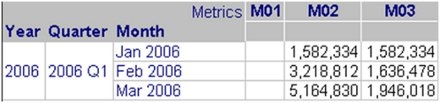
The security filter for the user is defined as Quarter = Q1 2006
If the security filter user runs a view report with all the objects in the Intelligent Cube, as shown below, the user will be able to see metrics M2 and M3 only. Since the Quarter attribute in the security filter is higher than the Month attribute which is included in the Break-by parameter of metric M3, the user is able to see M3 also. Quarter attribute being lower to the Year attribute which is included in the Break-by parameter of metric M1, the user is not able to see M1.
Multiple Attributes in the Security Filter
Consider an Intelligent Cube with attributes Year and Region and Metrics: M4, M5 and M6
M4 = RunningSum<BreakBy={Year}>(Revenue)
M5 = RunningSum<BreakBy={Region}>(Revenue)
M6 = RunningSum<BreakBy={Year, Region}>(Revenue)
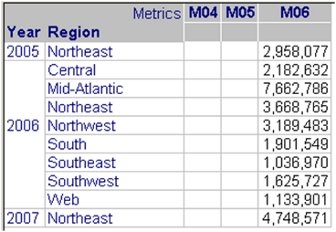
The security filter for the user is defined as Quarter = Q1 2006 or Region = Northeast
If the security filter user runs a view report with all the objects in the Intelligent Cube, as shown below, the user will be able to see metric M6 only. This is because M6 is the only metric which has a Breakby defined on both the attributes used in the security filter. Also note that the security filter is applied as defined. The user is able to see data where Year is 2006 OR where Region is Northeast.
Nested OLAP Function metrics
Consider an Intelligent Cube with attributes Year and Quarter and Metrics: M7, M8 and M9.
M7 = Rank<BreakBy={Quarter}>(RunningAvg<BreakBy={Quarter}>(Revenue))
M8 = Rank<BreakBy={Year}>(RunningAvg<BreakBy={Quarter}>(Revenue))
M9 = Rank<BreakBy={Quarter}>(RunningAvg<BreakBy={Year}>(Revenue))
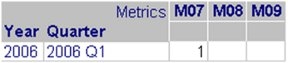
The security filter for the user is defined as Quarter = Q1 2006
If the security filter user runs a view report with all the objects in the Intelligent Cube, as shown below, the user will be able to see metric M7 only. M7 is the only metric which has a Break-by attribute which is equal to the security filter attribute. Since metrics M8 and M9 have Break-by attributes (for the innner or outer metric within the nested metric) which are higher than the security filter attribute, these are not displayed to the user.
KB417392
