EducationSoftwareStrategy.com
StrategyCommunity

Knowledge Base

Product

Community

Knowledge Base

TopicsBrowse ArticlesDeveloper Zone

Product

Download SoftwareProduct DocumentationSecurity Hub

Education

Tutorial VideosSolution GalleryEducation courses

Community

GuidelinesGrandmastersEvents
x_social-icon_white.svglinkedin_social-icon_white.svg
Strategy logoCommunity

© Strategy Inc. All Rights Reserved.

LegalTerms of UsePrivacy Policy
  1. Home
  2. Topics

KB308067: Derived metric not visible when creating new derived metric in MicroStrategy Web 10.


Community Admin

• Strategy


When creating new derived metric in a Report, Document or Dashboard in MicroStrategy Web, it is not displayed in a list of available metrics when creating another derived metric

SYMPTOM:
When creating new derived metric in a Report, Document or Dashboard in Strategy Web, it is not displayed in a list of available metrics when creating another derived metric as in the screenshot below:

ka04W000000OfsfQAC_0EM4400000025Ql.jpeg

STEPS TO REPRODUCE:
1. Create new Report, Document or Dashboard with some Attributes and Metrics.
2. Create new derived metric and call it "TEST1".
3. Create second derived metric and call it "TEST2"
TEST1 is not available as one of metrics that can be used to build TEST2
CAUSE:
This is an identified defect in Strategy
ACTION:
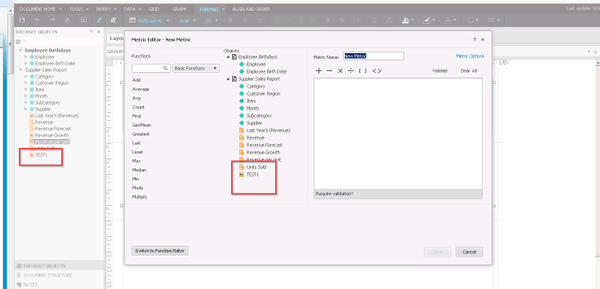
The issue has been fixed in Strategy 10.2 (take a look at the screenshot below). Please, upgrade to take an advantage of the fix.
ka04W000000OfsfQAC_0EM4400000025Qp.jpeg

Comment

0 comments

Details

Knowledge Article

Published:

June 7, 2017

Last Updated:

June 7, 2017