EducationSoftwareStrategy.com
StrategyCommunity

Knowledge Base

Product

Community

Knowledge Base

TopicsBrowse ArticlesDeveloper Zone

Product

Download SoftwareProduct DocumentationSecurity Hub

Education

Tutorial VideosSolution GalleryEducation courses

Community

GuidelinesGrandmastersEvents
x_social-icon_white.svglinkedin_social-icon_white.svg
Strategy logoCommunity

© Strategy Inc. All Rights Reserved.

LegalTerms of UsePrivacy Policy
  1. Home
  2. Topics

KB308085: Attributes cannot be linked between datasets in a document/dashboard in MicroStrategy Web 10.4 using "Link to" menu


Community Admin

• Strategy


After adding a dataset to a document or VI dashboard, users right-click a newly imported attribute but cannot link it to an attribute from another dataset using "Link to" menu as it is greyed out:
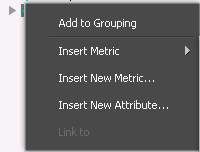
After adding a dataset to a document or VI dashboard, users right-click a newly imported attribute but cannot link it to an attribute from another dataset using "Link to" menu as it is greyed out:

ka04W000000OaSKQA0_0EM4400000025QX.jpeg

CAUSE:
This is working as designed. To successfully link attributes between datasets at the document/dashboard level, a set of rules need to be followed.
ACTION:
To enable linking of attributes from different datasets in a document or VI dashboard, please ensure that the following rules are followed: 

  1. The 2 attributes should not come from the same hierarchy (e.g. ‘year’ cannot be linked to ‘month’ because they have parent-child relation)
  2. The object to be linked should not be a Consolidation, Custom Group, New Derived Element, or DESC form of old Derived Element
  3. Data types of linked form should be compatible.
    a. Number type (integer/long/float etc.) can link to Number type only
    b. Big Decimal type can link to Big Decimal type only
    c. Date type can link to Date type only
    d. Time type can link to Time type only
    e. Date Time type can link to Date Time type only
    f. The following types of data can link to each other: Text, Email, HTML Tag, Phone Number, Symbol, URL

Please also note that when linking attribues between datasets in document, only ID forms can be linked; linking on DESC forms is not supported. Linking attributes in a dashboard supports linking between ID form and non-ID forms.
Related links:
KB203536: Difference between Link to project attribute form during Data Import Preview page and Link to project attribute in design mode of document/dashboard


Comment

0 comments

Details

Knowledge Article

Published:

June 5, 2017

Last Updated:

March 26, 2018