EducationSoftwareStrategy.com
StrategyCommunity

Knowledge Base

Product

Community

Knowledge Base

TopicsBrowse ArticlesDeveloper Zone

Product

Download SoftwareProduct DocumentationSecurity Hub

Education

Tutorial VideosSolution GalleryEducation courses

Community

GuidelinesGrandmastersEvents
x_social-icon_white.svglinkedin_social-icon_white.svg
Strategy logoCommunity

© Strategy Inc. All Rights Reserved.

LegalTerms of UsePrivacy Policy
  1. Home
  2. Topics

KB308108: User gets disabled after 2 failed attempts even though the Intelligence Server is configured to allow 5 failed attempts when login first in MicroStrategy Web 10.0 - 10.6.


Community Admin

• Strategy


User gets disabled after 2 failed attempts even though the Intelligence Server is configured to allow 5 failed attempts when login first in MicroStrategy Web 10.0 - 10.6.

SUMMARY:
This issue has been classified as a defect by Strategy.  A workaround is available in the current document. A solution/code fix for this issue is not available in current releases and has not been scoped for a future Strategy release.
SYMPTOM:
After configuring the Intelligence Server to allow 5 failed attempts before locking a user’s account, if the Project list option in Strategy Web is set to “Log in, then show the projects accessible by the supplied login”, the user account will get locked after 2 attempts.
STEPS TO REPRODUCE:
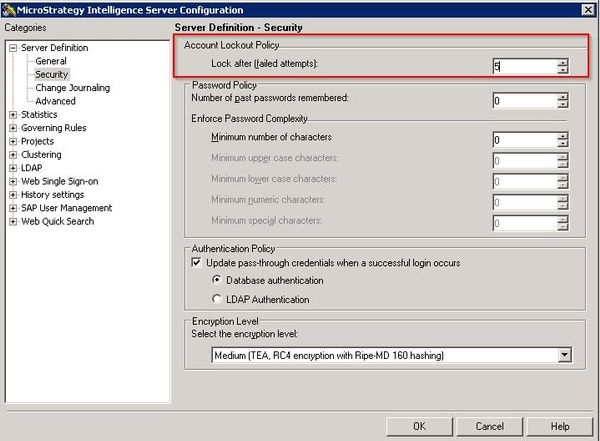
  1. Go to Developer and in a 3-tier project source, right-click and select Configure Intelligence Server.
  2. Go to Server Definition - Security and set the Lock after (failed attempts) to 5.


ka04W000000Oc0mQAC_0EM4400000025S6.jpeg


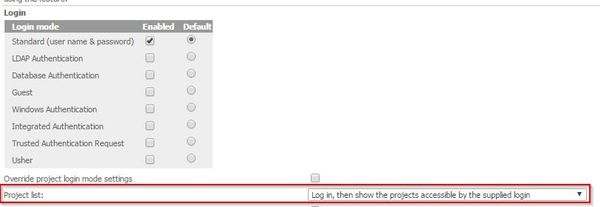
  1. Make sure the project list option for Web is set to login first by going to the Web Administrator page, then to Intelligence Servers - Default properties and select the "Log in, then show the projects accessible by the supplied login" option.


ka04W000000Oc0mQAC_0EM4400000025SE.jpeg


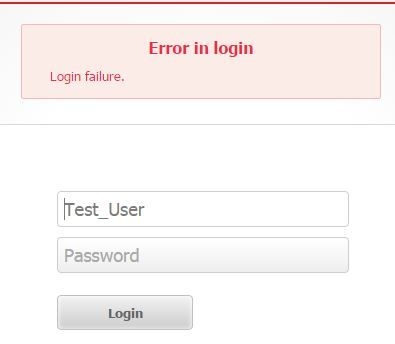
  1. Try to log in as any user that is not the Administrator with a wrong password 2 times, then try the third time with the correct password, in Web you will get a Login Failure message:


ka04W000000Oc0mQAC_0EM4400000025S8.jpeg

 
And in Developer, you will see the account has been disabled when you open the user.
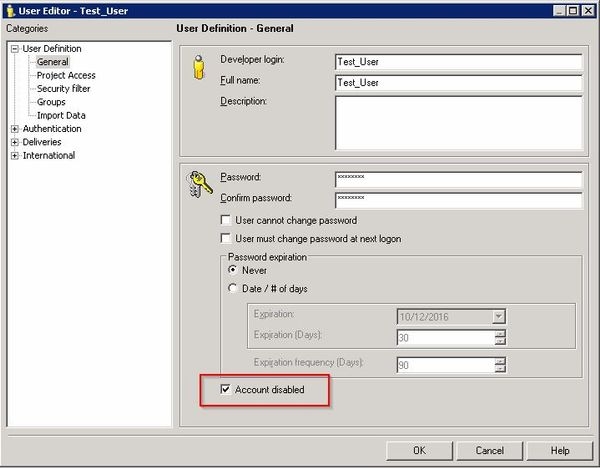
 

ka04W000000Oc0mQAC_0EM4400000025SG.jpeg

 CAUSE:
This is a known issue in Strategy Web 10.0 - 10.6.
ACTION:
This issue has been addressed in Strategy Web 10.7, which is a Feature Release. Upgrade to take advantage of the fix.
WORKAROUND:
The issue does not occur if the project list option for Web is set to “Show all the projects connected to the Web Sever before the user logs in”.


Comment

0 comments

Details

Knowledge Article

Published:

May 30, 2017

Last Updated:

May 30, 2017