EducationSoftwareStrategy.com
StrategyCommunity

Knowledge Base

Product

Community

Knowledge Base

TopicsBrowse ArticlesDeveloper Zone

Product

Download SoftwareProduct DocumentationSecurity Hub

Education

Tutorial VideosSolution GalleryEducation courses

Community

GuidelinesGrandmastersEvents
x_social-icon_white.svglinkedin_social-icon_white.svg
Strategy logoCommunity

© Strategy Inc. All Rights Reserved.

LegalTerms of UsePrivacy Policy
  1. Home
  2. Topics

KB308121: When creating a VI dashboard with the “Connect Live” option using a Hadoop Database; the row count metric generated shows repeated values even if the values should be different.


Community Admin

• Strategy


SUMMARY:
This issue has been classified as a defect by Strategy.  A workaround is available in the current document. A solution/code fix for this issue is not available in current releases but has been scoped for a future Strategy release.
SYMPTOM:
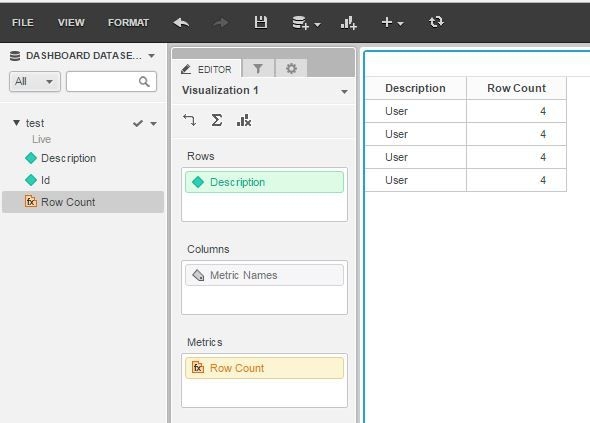
The Row count metric generated when importing data from an external source using a Hadoop Database does not show the correct values in a dashboard that uses the “Connect live” option unless the dashboard is refreshed.
STEPS TO REPRODUCE:

  1. Create a Hadoop Data source in Web.
  2. In Strategy Web, go to Add External Data, choosing the option for Hadoop and Pick Tables.
  3. Pick a table that has the underlying values:

ID

Description

1

User

1

User

10

User   ***

2

User *

3

User *

4

User  **

5

User  **

6

User  **

7

User   ***

8

User   ***

9

User   ***

 
* - This has a trailing space
** - This has two trailing spaces
*** - This has three trailing spaces
  1. Click Finish and select the Connect Live option.
  2. Create a dashboard based on this cube, and pick the Description attribute and Row Count metric, notice the values are repeated:


ka04W000000OePKQA0_0EM4400000025Rq.jpeg

CAUSE:
This is a known issue in Strategy Web 10.x.
ACTION:
This issue has been reviewed by the Technology team and has been scoped for a future Strategy release.
WORKAROUND:
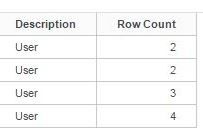
Refresh the dashboard using the Refresh button in the tool bar:

ka04W000000OePKQA0_0EM4400000025Rs.jpeg

 
Notice the values are correct now:
 

ka04W000000OePKQA0_0EM4400000025Ru.jpeg

Comment

0 comments

Details

Knowledge Article

Published:

June 9, 2017

Last Updated:

June 9, 2017