SYMPTOM
In Strategy the column alias specified for a fact is not used in the datamart creation SQL. Consider a simple datamart with attribute Year and metric Revenue in the Strategy Tutorial project. As shown below, the column alias for the Year ID is defined as CustCol_10 of datatype Numeric with Precision 9 and Scale 0. The fact column alias is defined as CustCol_12 of datatype Decimal with Precision 15 and Scale 0.
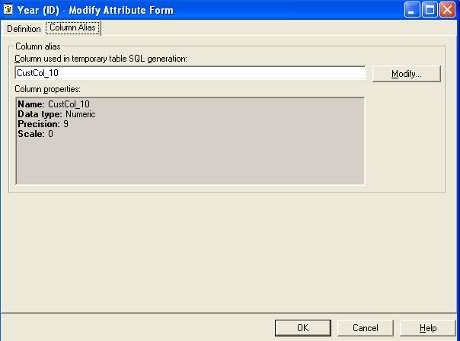
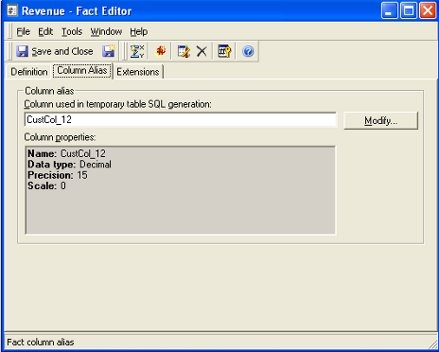
The datamart SQL is as shown below. The column alias specified for tha attribute ID is used in the SQL, but the fact column alias is not used.
create table YEAR_COST (
CustCol_10 NUMBER(9, 0),
Revenue NUMBER)
For information about creating and using datamarts in Strategy, refer to the following Strategy Knowledge Base document:
KB5395: How to create and use Datamarts in MicroStrategy Intelligence Server
CAUSE:
This is working as designed. The column alias used in the datamart creation SQL for a metric is not dependent on the fact column alias but depends on the metric column alias.
ACTION:
Modify the metric column alias through the metric editor from Tools > Advanced Settings > Metric Column Options, as shown below.
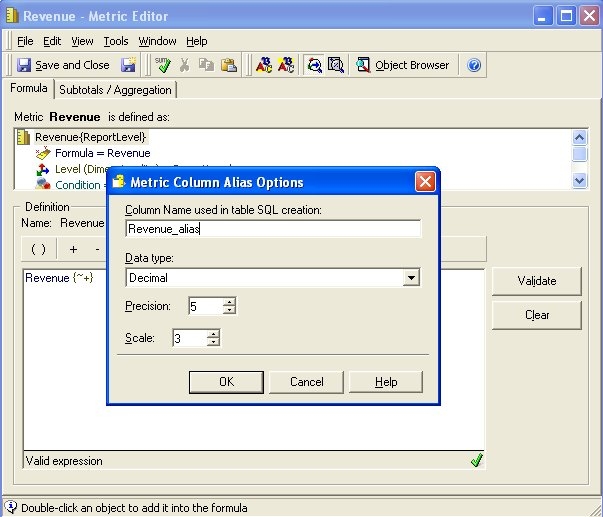
As shown below, the SQL for the datamart table creation is now as expected.
create table YEAR_COST (
CustCol_10 NUMBER(9, 0),
Revenue_alias NUMBER(5, 3))
