Users of Strategy Office 10.x notice they have two options when trying to update the data in their previously executed report: Refresh and Re-execute.
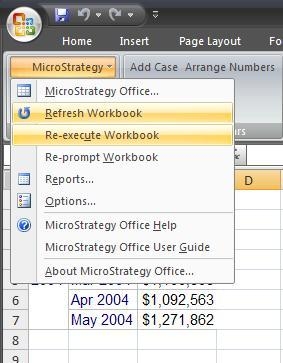
These options are used interchangeably in the Product Manuals, but have slightly different functions
Refresh
The option to Refresh will try to look for a report cache on the Intelligence Server. If the Cache Monitor is used to review the cache hit count, users will see the hit count increase for each time Refresh is clicked, like in the image below.
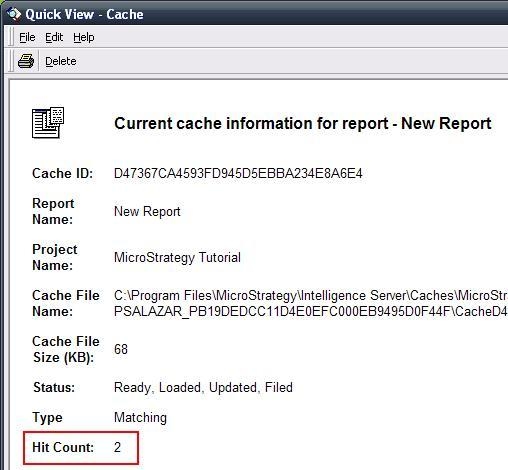
For a prompted report, the Refresh button will obey the same rules that Strategy Desktop and Web 8.1.x follow for using cache: If the same prompt answers are used, the report will use the existing cache. If the prompt answers change, a new cache file will be created.
Note: For more information regarding the ‘Reuse prompt answer’ option in Strategy Office 8.1.x, refer to the following tech note KB6900-75x-0008 ‘How can users be re-prompted for prompt answers on a saved report after refreshing in Strategy Office 8.1.x?’
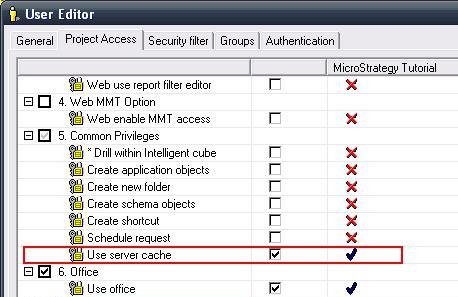
The behavior of the Refresh button is also affected by the permissions of the user. If the user is granted with the Common Privilege: Use Server Cache, it will behave as described above. If the user is denied this privilege, Refresh will work like Re-execute. The two permissions shown in the following image are required for Refresh to create or use a cache file.
Re-execute
The option to Re-execute will run the report against the warehouse without looking for any cache. This is regardless of whether the report is prompted or not, or using same prompt answers or not. Users will not see the cache hit count increase when using Re-execute.
