SYMPTOM:
In Strategy Desktop 9.x and Strategy Developer 10.x, the following error occurs when the Database Instance is configured to use Windows NT Authentication against the the Data Warehouse:
Sample Code/Error
Connect failed. Login failed.
Error type: Odbc error. Odbc operation attempted: SQLDriverConnect. Login failed for user `NT AUTHORITY\ANONYMOUS LOGON`. Driver`s SQLSetConnectAttr failed Connection String: DSN=;UID=;
CAUSE:
This issue occurs when the database instance's data source name (DSN) is set up to use Windows NT authentication. When this configuration is used, the Strategy Intelligence Server 9.x/10.x will attempt to connect as the user that is running the MSTRSvr.exe (Strategy Intelligence Server 9.x or10.x) process. It does not login as the user currently logged into the machine. If the SYSTEM account, or the account running the Strategy Intelligence Server process, cannot authenticate to the data warehouse, then the connection attempt will be unsuccessful.
ACTION:
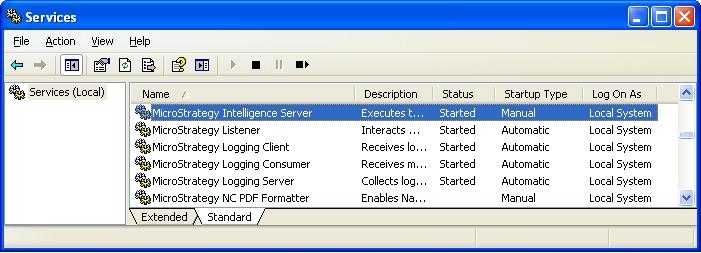
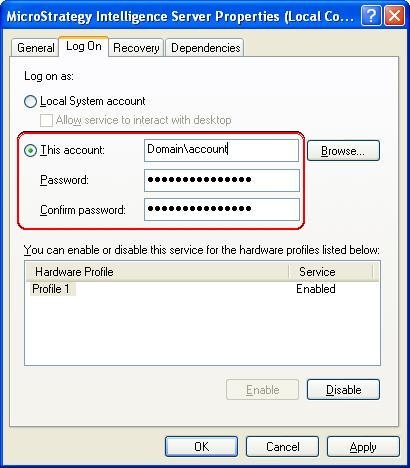
In order to resolve the issue, start the Strategy Intelligence Server 9.x or 10.x as a user which has access to the data warehouse: