SYMPTOM:
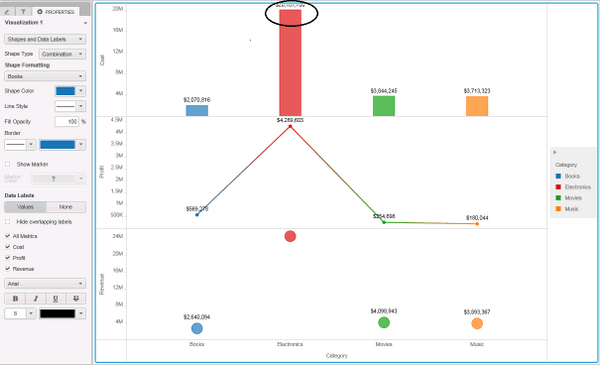
In Strategy Web 10.2, data labels for Combo Chart are overlapping with chart upper line border if “Hide overlapping labels” is not selected.
STEPS TO REPRODUCE:
Follow the steps below to reproduce the issue in Strategy Tutorial project:
1. Create a VI Dashboards with Category attribute and Cost, Profit and Revenue metrics.
2. Change the visualization type to Combo Chart.
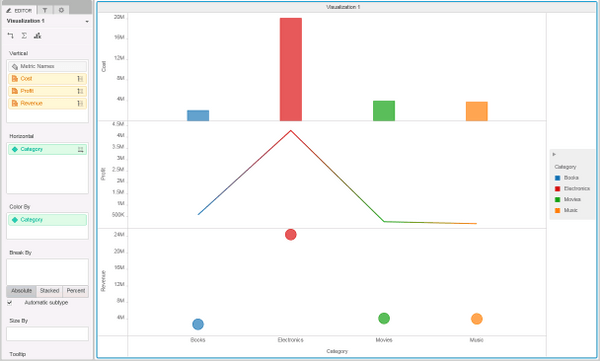
3. Insert all metrics in the Vertical box, Category attribute in the Horizontal and Color By boxes, as shown below (image "Layout" in attachment):
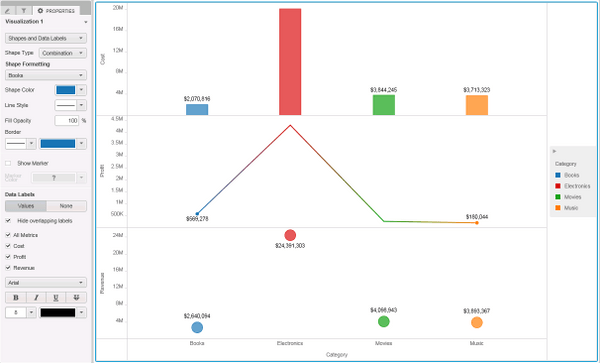
4. Right click on one of the bar, select Data Labels and choose Select Only Value. By default Hide overlapping labels is enabled and Data labels are properly displayed, as shown below (image "Hide_Overlap" in attachment):
5. In Properties, for Shape and Data Labels disable Hide overlapping labels; data labels are displayed as overlapping with Combo chart upper line border, as shown below (image "Disabled_HideOverlap" in attachment):
CAUSE:
The issue is known in Strategy 10.2 and Technology is investigating it.
KB308609
