EducationSoftwareStrategy.com
StrategyCommunity

Knowledge Base

Product

Community

Knowledge Base

TopicsBrowse ArticlesDeveloper Zone

Product

Download SoftwareProduct DocumentationSecurity Hub

Education

Tutorial VideosSolution GalleryEducation courses

Community

GuidelinesGrandmastersEvents
x_social-icon_white.svglinkedin_social-icon_white.svg
Strategy logoCommunity

© Strategy Inc. All Rights Reserved.

LegalTerms of UsePrivacy Policy
  1. Home
  2. Topics

KB30866: Which Schedules administrative tasks can be performed on all nodes of the cluster


Community Admin

• Strategy


This document provides a list of scheduled admin tasks that can be run on all nodes of a cluster

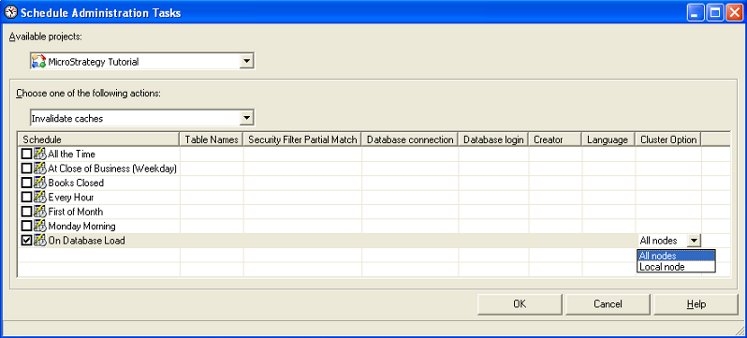
It is possible to run scheduled administrative tasks on all nodes of the cluster using time based or event based schedules. An option exists on the schedule administrative tasks editor, where users can choose to run a specified task on all nodes of the cluster or on the local node, as shown below. The default option is to run the task on all nodes of the cluster.
 
Note: Administrative tasks setup using time based schedules always execute on the primary node of the cluster if the cluster option is set to local node. For example,  if a time based schedule is used to delete caches on the local node and this task is setup from a non-primary node in the cluster, the caches are still deleted only from the primary node and the non-primary node caches are not deleted.
 
Note: Administrative tasks using event based schedules execute on the node of the cluster where the event is triggered, if the cluster option is set to local node.
 

ka04W000000OepOQAS_0EM440000002B3w.jpeg

 
The cluster option is only relevant for tasks that can be performed on either a single node or all nodes. As a result, the Cluster option column in the schedule administratitive tasks editor is only available for the following tasks:

  • Delete caches
  • Invalidate caches
  • Purge element caches
  • Idle project
  • Resume project
  • Load project
  • Unload project
     

The cluster option column is current not available for the following administrative tasks:

  • Activate Intelligent Cube
  • Deactivate Intelligent Cube
  • Refresh Intelligent Cube
  • Delete Intelligent Cube
  • Delete unused managed objects
  • Delete History List Messages
  • Purge Statistics

Note: The following changes have been in Strategy 9.0.1 to the administrative task "Refresh Intelligent Cube"

  1. Refresh Intelligent Cube is called "Update Intelligent Cube" in Strategy 9.0.1.
  2. This administrative task now also has the cluster option column to select which node the task must be executed.


Comment

0 comments

Details

Knowledge Article

Published:

February 26, 2018

Last Updated:

February 26, 2018