EducationSoftwareStrategy.com
StrategyCommunity

Knowledge Base

Product

Community

Knowledge Base

TopicsBrowse ArticlesDeveloper Zone

Product

Download SoftwareProduct DocumentationSecurity Hub

Education

Tutorial VideosSolution GalleryEducation courses

Community

GuidelinesGrandmastersEvents
x_social-icon_white.svglinkedin_social-icon_white.svg
Strategy logoCommunity

© Strategy Inc. All Rights Reserved.

LegalTerms of UsePrivacy Policy
  1. Home
  2. Topics

KB308793:Error message ‘Unhandled Exception’ error’ appears during MicroStrategy 10.3 installations on AIX.


Community Admin

• Strategy


Error message ‘Unhandled Exception’ error’ appears during MicroStrategy 10.3 installations on AIX.

Symptom:
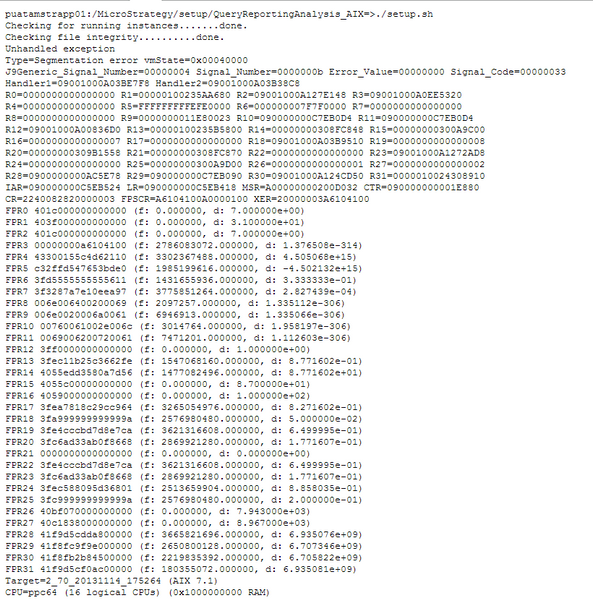
When users install Strategy 10.3 in AIX 7.1, there are chances that error message ‘Unhandled Exception’ appears as showed below.
ka04W000000OgvnQAC_0EM4400000029AF.jpeg

This error occurred in the very beginning of the installation, so no install log will generated.
Cause:
Possible cause are as below.

  1. JAVA version is not certified  
  2. JAVA is installed improperly

Action:

  1. Check the JAVA version. In Strategy 10.3, JAVA JDK or JRE version 1.7 or 1.8 is required (64-bit recommended).  
  2. reinstall JAVA and reinstall Strategy.


Comment

0 comments

Details

Knowledge Article

Published:

June 7, 2017

Last Updated:

June 7, 2017