EducationSoftwareStrategy.com
StrategyCommunity

Knowledge Base

Product

Community

Knowledge Base

TopicsBrowse ArticlesDeveloper Zone

Product

Download SoftwareProduct DocumentationSecurity Hub

Education

Tutorial VideosSolution GalleryEducation courses

Community

GuidelinesGrandmastersEvents
x_social-icon_white.svglinkedin_social-icon_white.svg
Strategy logoCommunity

© Strategy Inc. All Rights Reserved.

LegalTerms of UsePrivacy Policy
  1. Home
  2. Topics

KB30882: Metrics are missing when executing a report even though the 'View' permission for the Everyone group is added to the ACLs of the metrics in MicroStrategy 9.x and 10.x


Stefan Zepeda

Salesforce Solutions Architect • Strategy


Metrics are missing when executing a report even though the 'View' permission for the Everyone group is added to the ACLs of the metrics in MicroStrategy 9.x and 10.x

SYMPTOM:
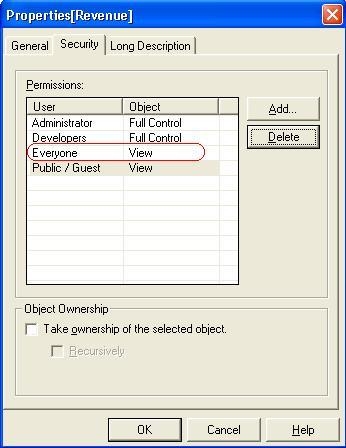
After a user executes a report it returns data but with a metric missing. This issue occurs even though 'View' permission for the Everyone group or the user itself is added to the ACLs of metrics as shown below:


ka02R000000kVbAQAU_0EM440000002EOl.jpeg

 
Administrators that execute the report do not see this problem since it is user-specific.
 
 
CAUSE:
The Access Control List (ACL) for the report might not have been updated.
 
ACTION:
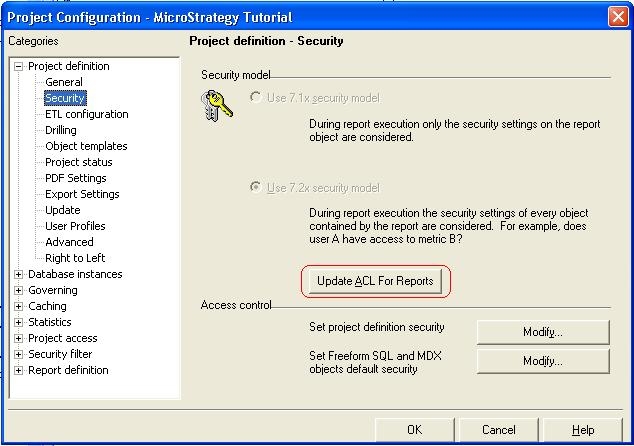
In the Project Configuration -> Project definition -> Security dialog box for a project click the "Update ACL for Reports" as shown in the image below:
 

ka02R000000kVbAQAU_0EM440000002EOf.jpeg

 
For further information on which objects are modified by clicking 'Update ACL For Reports' refer to the following Strategy Knowledge Base document:
 
KB5700-7XX-1644 - Which objects are modified by clicking 'Update ACL For Reports'?


Comment

0 comments

Details

Knowledge Article

Published:

May 31, 2017

Last Updated:

May 31, 2017