EducationSoftwareStrategy.com
StrategyCommunity

Knowledge Base

Product

Community

Knowledge Base

TopicsBrowse ArticlesDeveloper Zone

Product

Download SoftwareProduct DocumentationSecurity Hub

Education

Tutorial VideosSolution GalleryEducation courses

Community

GuidelinesGrandmastersEvents
x_social-icon_white.svglinkedin_social-icon_white.svg
Strategy logoCommunity

© Strategy Inc. All Rights Reserved.

LegalTerms of UsePrivacy Policy
  1. Home
  2. Topics

KB30891: How can Microsoft Performance Monitor in 64-bit Windows operating systems show memory related performance counters for the MicroStrategy Intelligence Server 9.x process beyond 4 GB?


Community Admin

• Strategy


In 64-bit Windows operating systems, there are two versions of Microsoft Performance Monitor (perfmon.exe):

  1. 32-bit version located at \Windows\SysWOW64
  2. 64-bit version located at \WINDOWS\system32

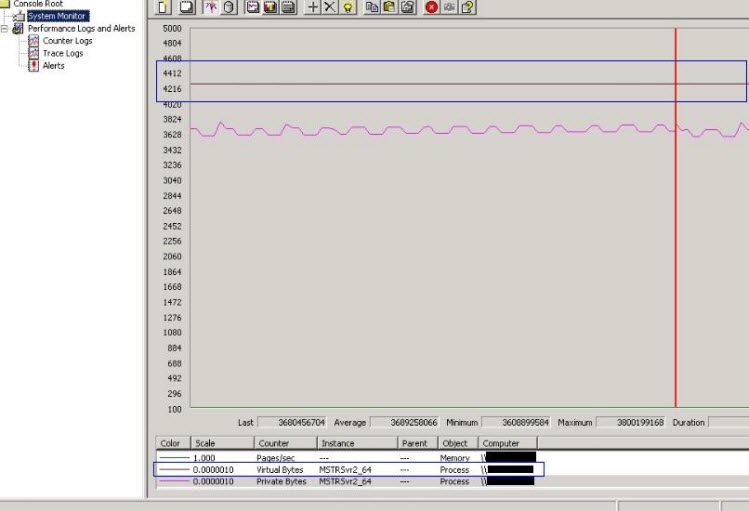
The 32-bit version only shows memory values upto, but not beyond, 4 GB while monitoring processes. This will affect all of the Strategy Intelligence Server 9.x memory related counters, such as Process -> Virtual Bytes or Process -> Private Bytes:
 

ka04W000000OeWgQAK_0EM440000002B3f.jpeg

 
The 64-bit version of Microsoft Performance Monitor shows correct values for these performance counters. In 64-bit Windows environments, use the executable perfmon.exe located at \WINDOWS\system32 for recording correct values for the performance counters.


Comment

0 comments

Details

Knowledge Article

Published:

June 9, 2017

Last Updated:

June 9, 2017