SYMPTOM:
Users may notice that reports that are scheduled to be sent to their history list at a specific time, using time based schedules, are actually completed later than this expected time. In screen shot shown below, report jobs that are scheduled to be sent to a user's history list at 10 am EST are actually created at 12 pm EST.
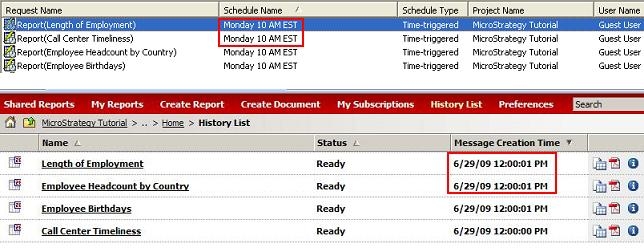
Administrators may turn on the Kernel -> Scheduler Trace diagnostic logging to verify the exact time a schedule is triggered, and the associated report or document job is executed by the Intelligence Server. After turning on this diagnostic logging, it may be observed that the schedule is triggered on time as expected, but execution of the scheduled jobs is extremely slow.
CAUSE:
When a schedule event is triggered (such as a time based schedule at the event time), the Intelligence Server scheduler component logs in the users belonging to the schedule one after another in a serial fashion. After the user session is created, the scheduler component attempts to execute the document or report jobs for the user session.
If the Kernel -> User Trace logging is turned on for the Intelligence Server, every history list message for a user is logged to the output (file or console) when the user is logged in. This logging can be slow for a number of factors - slow disk I/O, large number of history list messages for the users, large log file destination size etc. When the Intelligence Server is writing out this trace, the scheduler component cannot log any other users into the Intelligence Server, and the execution of the user jobs is delayed. The amount of delay is dependent on the specific scenario, and some systems may see negligible impact of this trace.

ACTION:
Users should turn off any unnecessary logging for the Kernel > User Trace dispatcher to avoid the impact to the Strategy Intelligence performance when a large number of user sessions are created concurrently.
