EducationSoftwareStrategy.com
StrategyCommunity

Knowledge Base

Product

Community

Knowledge Base

TopicsBrowse ArticlesDeveloper Zone

Product

Download SoftwareProduct DocumentationSecurity Hub

Education

Tutorial VideosSolution GalleryEducation courses

Community

GuidelinesGrandmastersEvents
x_social-icon_white.svglinkedin_social-icon_white.svg
Strategy logoCommunity

© Strategy Inc. All Rights Reserved.

LegalTerms of UsePrivacy Policy
  1. Home
  2. Topics

KB30931: Images in a report header do not show up even after using the correct image references in MicroStrategy Web 9.x


Community Admin

• Strategy


Images in a report header do not show up even after using the correct image references in MicroStrategy Web 9.x

SYMPTOM:
Users trying to add an image to the Report header in Strategy Web 9.x notice that the image is not showing up even after following technical note KB5600-8X-2057: How to embed an image in a custom header/footer to export to PDF in Strategy Web 9.x.
 
CAUSE:
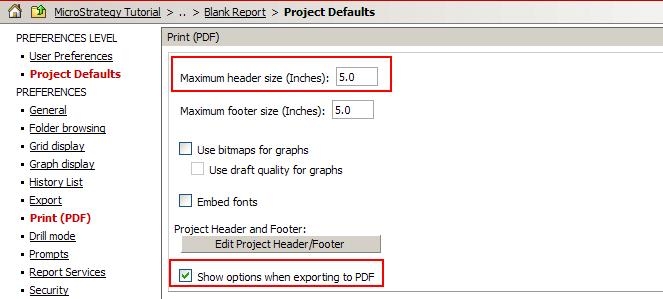
The user has a maximum of 5 inches to set for the header of a report. The minimum is 0 inches, but the image will not show up if the setting is set to this value.
 
ACTION:
Go into the Preferences section > Project Defaults > Print (PDF) > Maximum header size (Inches), and set it to a value between 1 and 5, like shown in the image below.
ka04W000000Oe7fQAC_0EM4400000028IR.jpeg

Comment

0 comments

Details

Knowledge Article

Published:

June 14, 2017

Last Updated:

June 14, 2017