SYMPTOM:
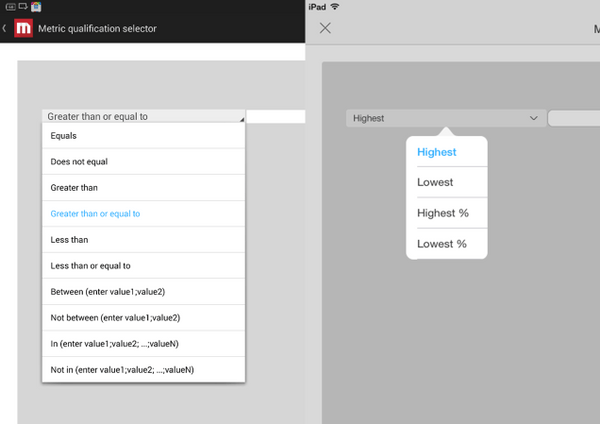
Users may set metric qualification selector qualified on rank like rank highest so that they can filter objects with rank functions. However, these functions are missing in metric qualification selector on Strategy mobile 10.4 and newer client for Android.
What it looks like on Android: What it looks like on iOS:
STEPS TO REPRODUCE
1) Create a report with 1 attribute and 1 metric
2) Create a document with the report created in the last step as the dataset
3) Insert a metric qualification selector based on the metric
4) Right mouse click on the selector, choose Properties and Formatting.
5) Set the Qualify on in Selector as Rank Highest. Save and close
6) Check this document on iOS devices, there are 4 rank functions in the selector. Check this document on Android devices, there are the functions for value in the selector.
CAUSE:
This is a known issue in Strategy Mobile 10.4 and newer
ACTION:
This issue has been addressed in Strategy Platform Mobile App 11.0. Please upgrade to this version to take advantage of the fix when it is released.
KB309452
