EducationSoftwareStrategy.com
StrategyCommunity

Knowledge Base

Product

Community

Knowledge Base

TopicsBrowse ArticlesDeveloper Zone

Product

Download SoftwareProduct DocumentationSecurity Hub

Education

Tutorial VideosSolution GalleryEducation courses

Community

GuidelinesGrandmastersEvents
x_social-icon_white.svglinkedin_social-icon_white.svg
Strategy logoCommunity

© Strategy Inc. All Rights Reserved.

LegalTerms of UsePrivacy Policy
  1. Home
  2. Topics

KB309489: Editing Security Filters in Developer displays the error message "Error encountered while generating text for this qualification", if built using Command Manager in MicroStrategy 10.3 - 10.6


Stefan Zepeda

Salesforce Solutions Architect • Strategy


Editing Security Filters in Developer displays the error message "Error encountered while generating text for this qualification", if built using Command Manager in MicroStrategy 10.3 - 10.6

SYMPTOM:
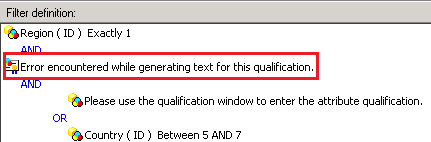
When editing Security filters in Developer, the error message "Error encountered while generating text for this qualification" is displayed in FIlter definition panel if these objects are built using Command Manager in Strategy 10.3 - 10.6, as shown below:
 

ka04W000001Ir9HQAS_0EM440000002C0j.jpeg

 
STEPS TO REPROUCE:
Follow steps below to reproduce the issue in Strategy Tutorial project:
 
1. Launch Command Manager and connect to Strategy Analytics Modules Project source.
 
2. Execute the following command:
Execute the script CREATE SECURITY FILTER "TEST2" FOLDER "\Project Objects\MD Security Filters" IN PROJECT "Strategy Tutorial" EXPRESSION '[Region]@ID=1 AND (([Country]@ID BETWEEN 1 AND 3) OR ([Country]@ID BETWEEN 5 AND 7))';
3. Launch Strategy Developer and search for object “TEST2”.
 
4. Edit it and note the error message "Error encountered while generating text for this qualification" in Filter definition.
 
ACTION:
The issue has been fixed in Strategy 10.7


Comment

0 comments

Details

Knowledge Article

Published:

June 8, 2017

Last Updated:

March 24, 2018