EducationSoftwareStrategy.com
StrategyCommunity

Knowledge Base

Product

Community

Knowledge Base

TopicsBrowse ArticlesDeveloper Zone

Product

Download SoftwareProduct DocumentationSecurity Hub

Education

Tutorial VideosSolution GalleryEducation courses

Community

GuidelinesGrandmastersEvents
x_social-icon_white.svglinkedin_social-icon_white.svg
Strategy logoCommunity

© Strategy Inc. All Rights Reserved.

LegalTerms of UsePrivacy Policy
  1. Home
  2. Topics

KB30953: Bar Graphs do not show the Gradient option for Background type in MicroStrategy Developer 10.x


Stefan Zepeda

Salesforce Solutions Architect • Strategy


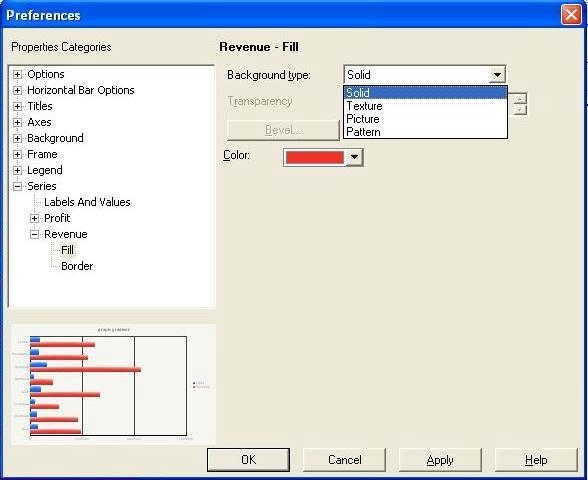
In MicroStrategy 10.x the Gradient option in the Background type is not enabled by default in bar graphs.

SYMPTOM:
 
In Strategy 10.x the Gradient option in the Background type is not enabled by default in bar graphs.
 
CAUSE:
 
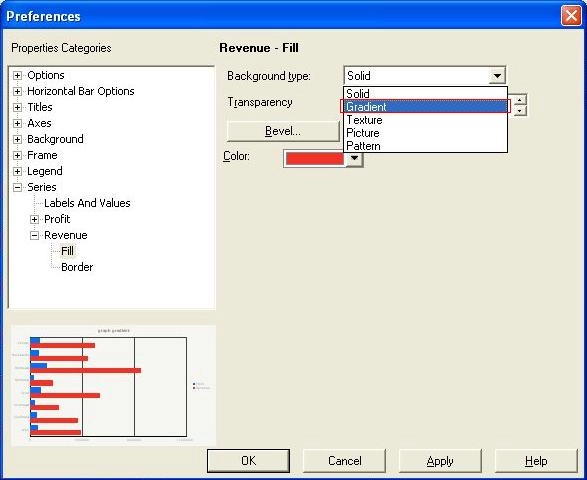
In Strategy 10.x the Gradient option is not shown when using option “Apply rounded effects to all series” or Bevel option is not set to ‘None’.
 

ka02R000000kVp3QAE_0EM440000002EPt.jpeg


ACTION:
 
To show the Gradient option:
  • Run the report in Strategy Developer in graph view.
  • Right click a bar riser and select ‘Format bar riser’.
ka02R000000kVp3QAE_0EM440000002EPT.jpeg
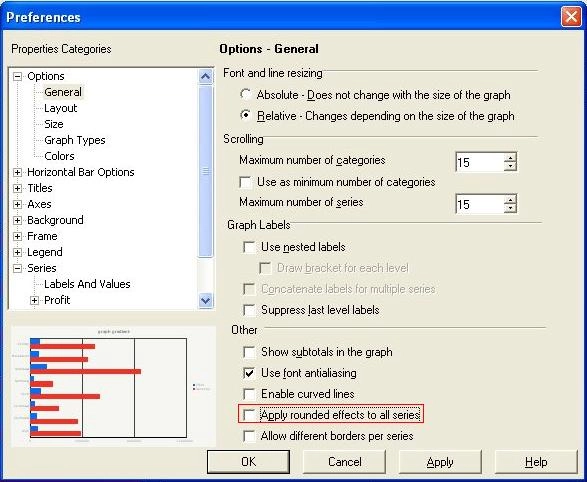
  • Expand the Options section and select General.
  • Uncheck option ‘Apply rounded effects to all series’.
ka02R000000kVp3QAE_0EM440000002EPn.jpeg
  • Expand the Series section and select the Fill option for the metric.
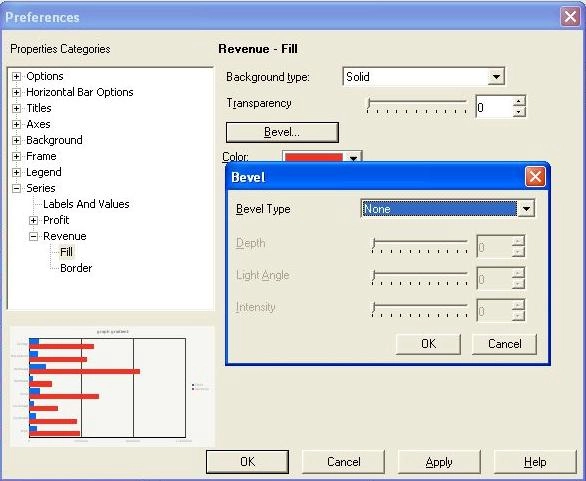
  • Click on Bevel to make sure ‘None’ is selected in the Bevel window.
ka02R000000kVp3QAE_0EM440000002EPr.jpeg
  • Click in the drop down menu for Background type and check that Gradient now appears.
ka02R000000kVp3QAE_0EM440000002EPR.jpeg


Comment

0 comments

Details

Knowledge Article

Published:

May 23, 2017

Last Updated:

May 23, 2017